Introduction to IIIF Presentation API Validation Methods with Practical Examples

Overview As described in a previous article, I developed an application that delivers IIIF manifest files and provides the IIIF Content Search API. https://zenn.dev/nakamura196/articles/76bdc86b1b7524 However, there were parts that did not conform to the API specifications. This article shares the corrections made and introduces how to use the Presentation API Validator with practical examples. https://presentation-validator.iiif.io/ Manifest File Corrections Access the Presentation API Validator site above, enter the manifest file URL in URL of Manifest to Validate, and select the corresponding API version (in this case, 3.0). ...
April 6, 2022 · Updated: April 6, 2022 · 4 min · Nakamura

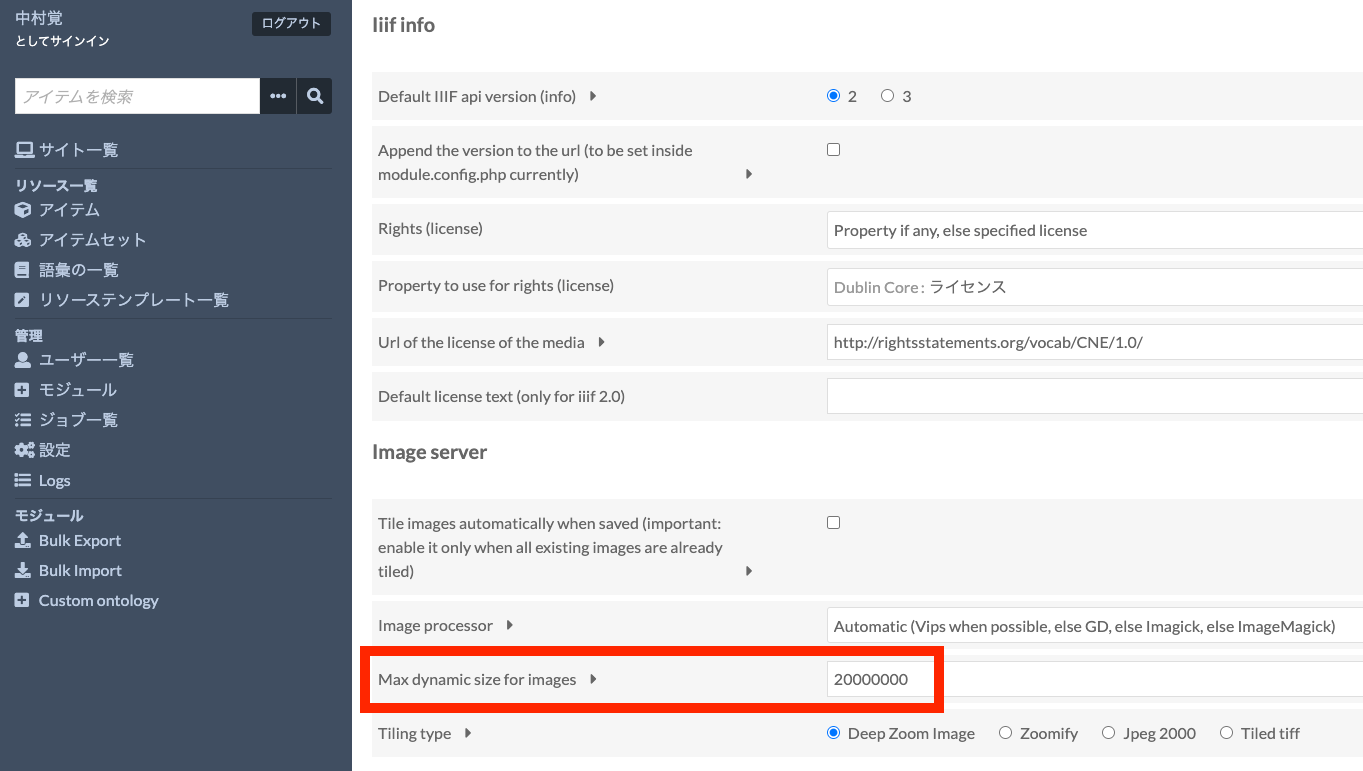
About Image Size Limits for Dynamic Tile Image Generation in the Omeka S Image Server Module

The Omeka S Image Server module has a feature that dynamically generates tile images for uploaded images. By using this feature, users can simply upload JPG or PNG images, and Omeka will dynamically generate tile images according to requests, delivering images compliant with the IIIF Image API. Note: On the other hand, when server specifications are limited, this dynamic tile image generation process may take time. In such cases, an option to pre-generate tile images is also available. This will be discussed later. ...

April 6, 2022 · Updated: April 6, 2022 · 2 min · Nakamura

GCP: Handling Errors When Creating AI Platform Notebooks

I created a notebook instance using the following as a reference. https://cloud.google.com/blog/ja/topics/developers-practitioners/pytorch-google-cloud-how-train-pytorch-models-ai-platform gcloud notebooks instances create example-instance \ --vm-image-project=deeplearning-platform-release \ --vm-image-family=pytorch-1-7-cu110-notebooks \ --machine-type=n1-standard-4 \ --location=us-central1-a \ --boot-disk-size=100 \ --accelerator-core-count=1 \ --accelerator-type=NVIDIA_TESLA_T4 \ --install-gpu-driver \ --network=default At that time, I was unable to create the notebook instance due to the following error. ERROR: (gcloud.notebooks.instances.create) The zone 'projects/{project}/zones/us-central1-a' does not have enough resources available to fulfill the request. '(resource type:compute)'. Therefore, I changed the location from us-central1-a to us-central1-b, and was able to create the instance. ...

April 5, 2022 · Updated: April 5, 2022 · 1 min · Nakamura

How to Delete a Feature Store in GCP Vertex AI

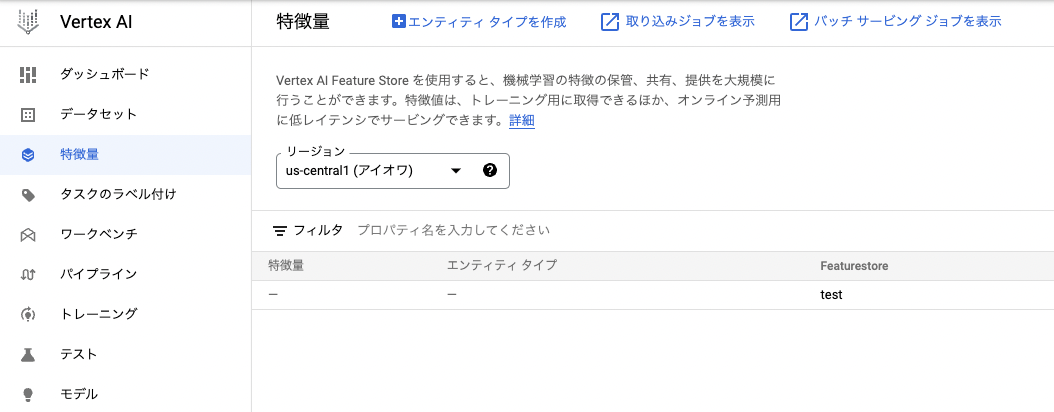
Overview This is a note on how to delete a feature store in Vertex AI on GCP (Google Cloud Platform). I later noticed that official documentation was available at the following link. https://cloud.google.com/vertex-ai/docs/featurestore/managing-featurestores#delete_a_featurestore Method In this example, I will attempt to delete a feature store called test as shown below. It could be deleted by executing the following command. (I was unable to find a way to delete it from the GUI.) ...

April 5, 2022 · Updated: April 5, 2022 · 1 min · Nakamura

[Development Guide] I Created an App to View OCR Results Published by the National Diet Library's Next-Generation Digital Library in an IIIF Viewer

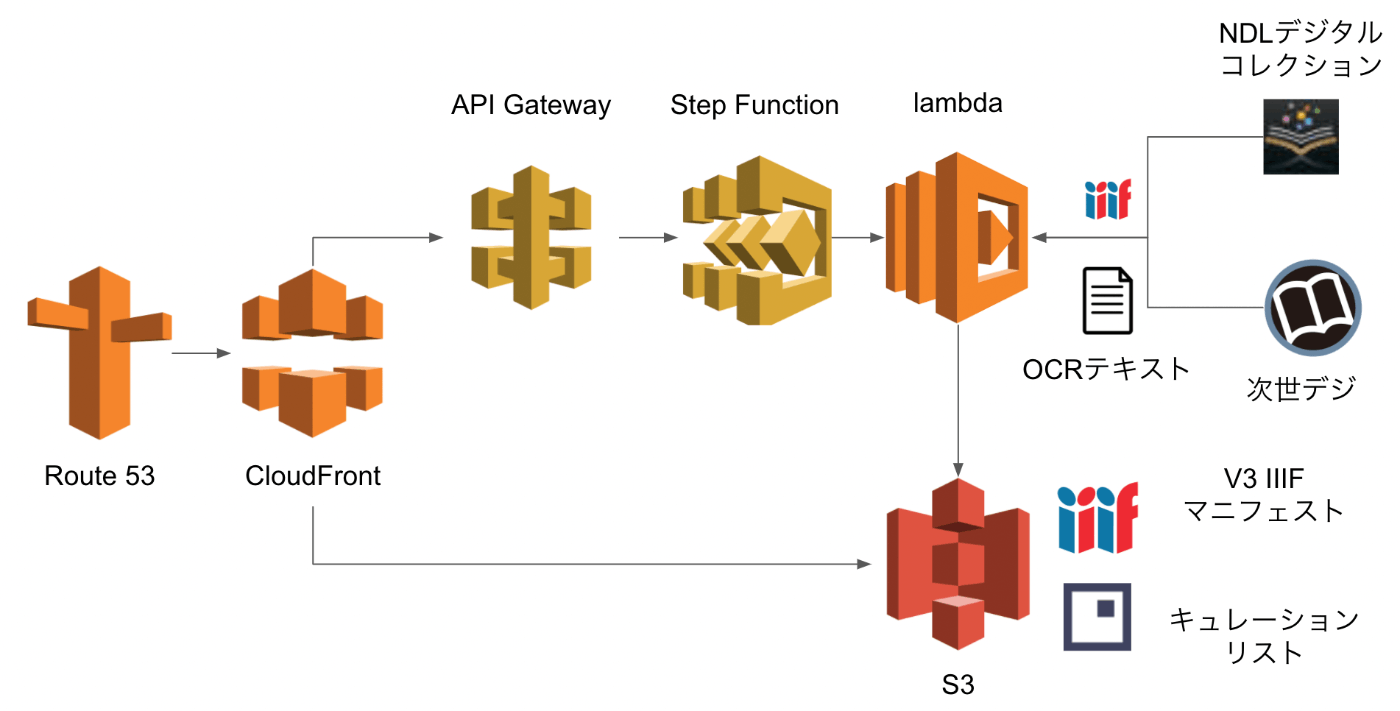
Overview I created an app to view OCR results published by the National Diet Library’s “Next-Generation Digital Library” in an IIIF viewer. The usage instructions are summarized in the following article. This time, I will explain how to build the above app. Build Method Backend I used AWS. The system was primarily built using SAM (Serverless Application Model). Creating IIIF Manifests & Curation Lists The flow for generating IIIF manifests and curation lists reflecting the OCR results published by the Next-Generation Digital Library is as follows. ...

April 4, 2022 · Updated: April 4, 2022 · 2 min · Nakamura

An App for Viewing OCR Results from the NDL "Next-Generation Digital Library" in an IIIF Viewer

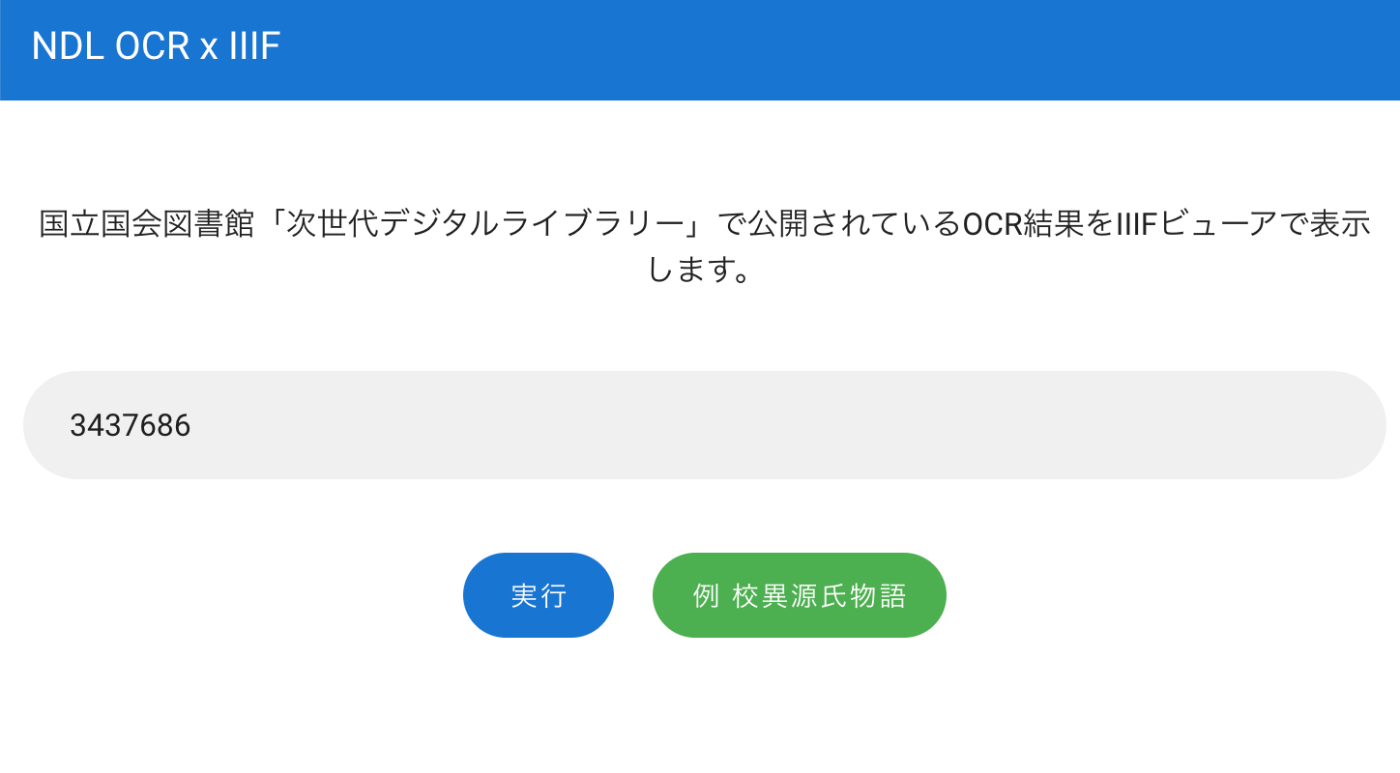
Overview I created an app for viewing OCR results published on the National Diet Library’s “Next-Generation Digital Library” in an IIIF viewer. You can try it at the following URL. https://static.ldas.jp/ndl-ocr-iiif/ Usage Enter the ID of a material published on the “Next-Generation Digital Library” in the input form. After a short while, buttons for “Mirador” and CODH’s “Curation Viewer” will appear. You can view the OCR results in each viewer. ...

April 3, 2022 · Updated: April 3, 2022 · 1 min · Nakamura

Creating Pyramid Tiled TIFF Files Using AWS Lambda + Docker + pyvips

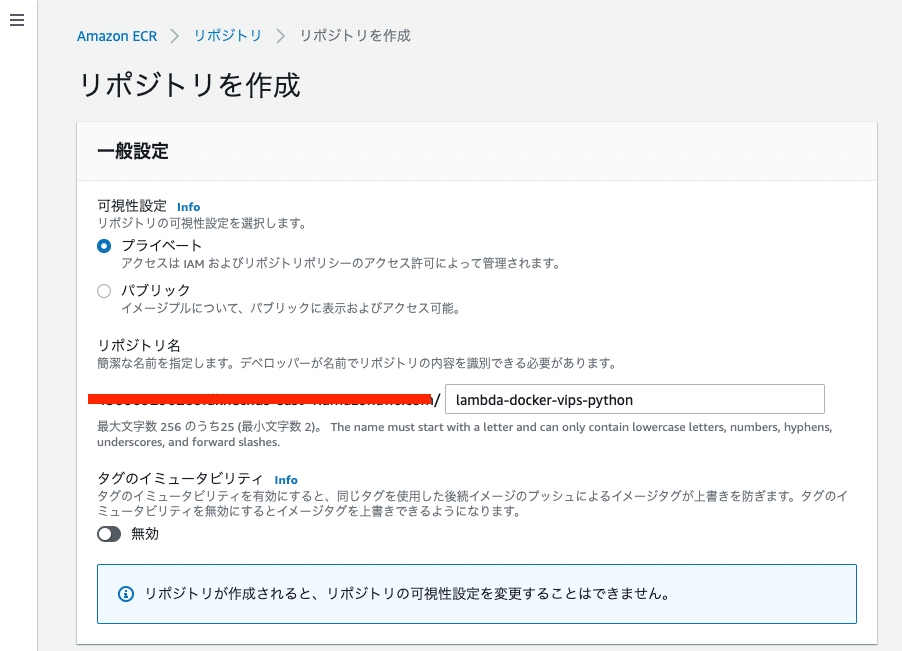
Overview I created a Docker image that uses AWS Lambda and pyvips to generate Pyramid Tiled TIFF files from images stored in S3. The Amazon ECR Public Gallery is available here: https://gallery.ecr.aws/nakamura196/lambda-docker-vips-python The source code is available here: https://github.com/ldasjp8/lambda-docker-vips-python Below, I will explain how to use it. Creating an Amazon ECR Repository First, create an ECR repository. Next, check the commands from “View push commands” and push the image. ...

March 31, 2022 · Updated: March 31, 2022 · 3 min · Nakamura

How to Use pyvips and Create Pyramid Tiled TIFF Files

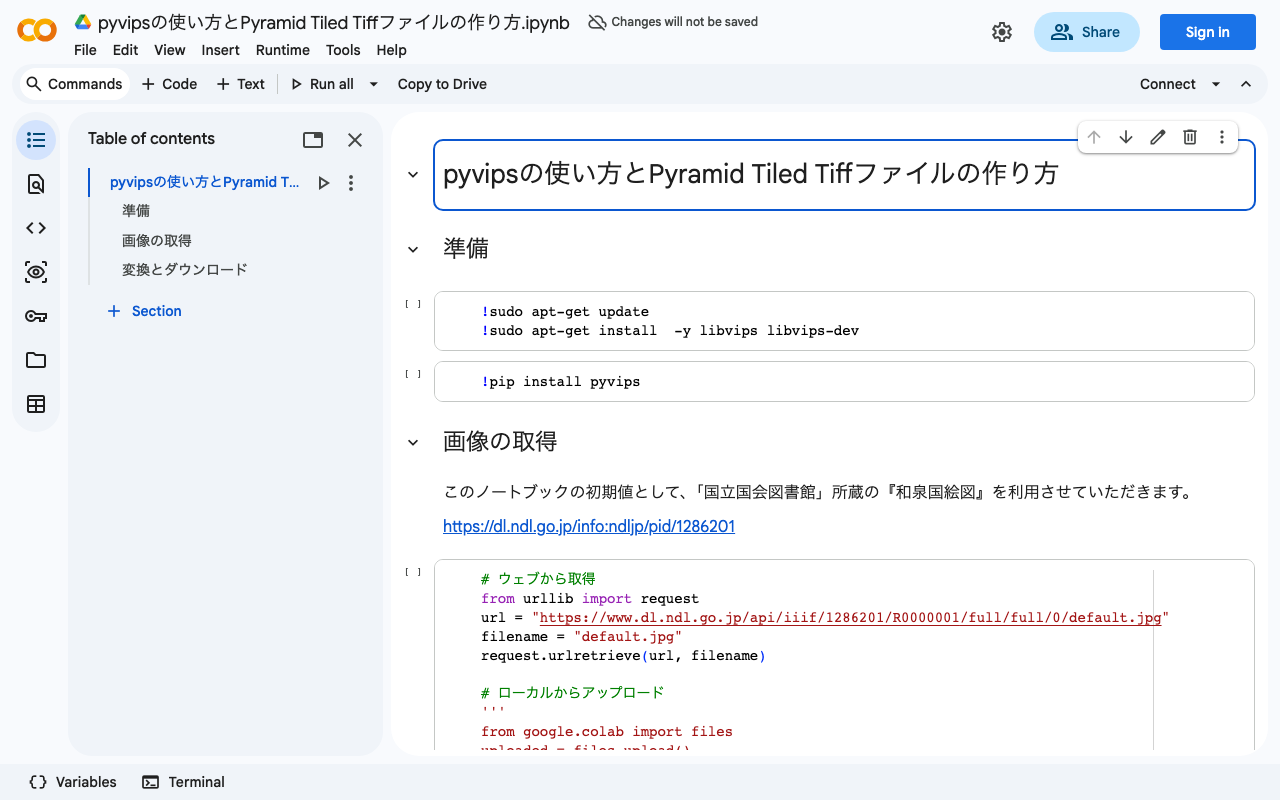
Overview I created a program to generate Pyramid Tiled TIFF files using pyvips. You can try it on the following Google Colab. https://colab.research.google.com/drive/1VO1PgKgS3H21zXpg4g2inN-mtIrON5TQ?usp=sharing When delivering images via IIIF, there are situations where Pyramid Tiled TIFF files need to be created. We hope this is helpful for image conversion using Python and Vips. The parameters are based on the following. https://github.com/samvera-labs/serverless-iiif#using-vips Also, as one example of how to deliver converted Pyramid Tiled TIFF files, the following article may also be helpful. ...

March 30, 2022 · Updated: March 30, 2022 · 1 min · Nakamura

[Memo] How to Use Maplat

This is a memo on how to use Maplat, a historical map viewer library. https://github.com/code4history/Maplat In addition to the above GitHub repository, the following Qiita articles are also helpful. https://qiita.com/tags/maplat?page=1 Downloading MaplatEditor Download the latest version of MaplatEditor from the following page. https://github.com/code4history/MaplatEditor/wiki Creating Data Launch the installed MaplatEditor and click the “New” button. Enter the required metadata. The items shown in the figure below are mandatory fields. ...

March 25, 2022 · Updated: March 25, 2022 · 4 min · Nakamura

I Created a Calendar Search App

Overview I created a web application that displays information in a calendar format. Below is a display example targeting a list of Hatena Blog articles. https://static.ldas.jp/calendar/?u=https://nakamura196.github.io/json/calendar.json https://github.com/ldasjp8/calendar You can check the display example by accessing the following URL and clicking the “Example” button, then the “Add” button. https://static.ldas.jp/calendar/ You specify the URL of a JSON file in the following format as a parameter. https://nakamura196.github.io/json/calendar.json Below, I will explain how to create the JSON file from an Excel file as one example method. ...

March 24, 2022 · Updated: March 24, 2022 · 2 min · Nakamura

Building an Object Detection API Using AWS Lambda (Flask + YOLOv5)

Overview We build an object detection API (Flask + YOLOv5) using AWS Lambda. By building a machine learning inference model using AWS Lambda, we aim to reduce costs. The following article was used as a reference. https://zenn.dev/gokauz/articles/72e543796a6423 Updates to the repository contents and additions of how to use it from API Gateway have been made. Registering Functions on Lambda Clone the following GitHub repository. git clone https://github.com/ldasjp8/yolov5-lambda.git Running Locally Next, create a virtual environment using venv and install the modules. ...

March 24, 2022 · Updated: March 24, 2022 · 4 min · Nakamura

[Omeka S Theme Development] Published a Bootstrap 5 Theme for Omeka S

I published a Bootstrap 5 theme for Omeka S. https://github.com/ldasjp8/Omeka-S-theme-Bootstrap5 Below is an explanation of how to use it, including information for developers. The following settings are available on the theme settings screen. I will explain some of the settings above. Footer Content Enter the text to display in the footer. You can also enter HTML as shown below. Site Sub Title When a subtitle is set, it is displayed on the top page as shown below. Note that this feature only works when the “Next” module is enabled. ...

March 23, 2022 · Updated: March 23, 2022 · 3 min · Nakamura

[Omeka S Module] How to Use Clean Url

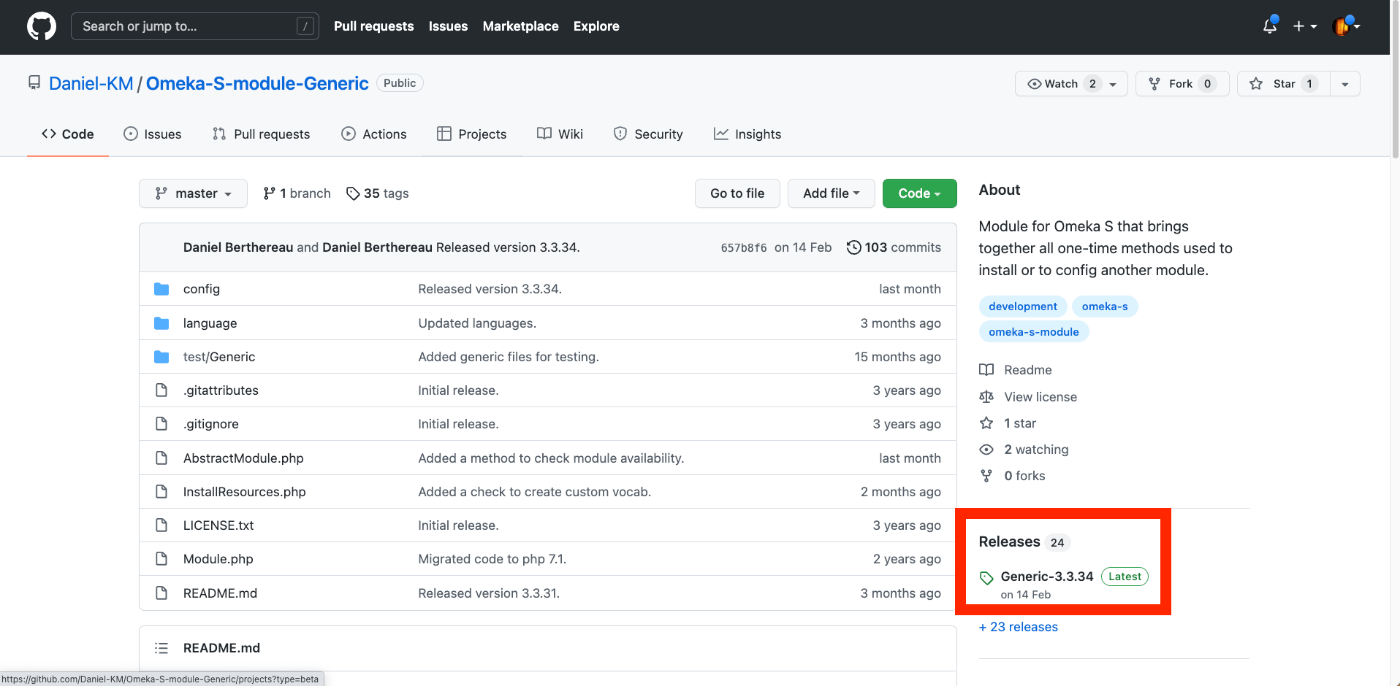
Overview This article explains how to assign identifiers to resources (item sets, items, media) in Omeka S. Specifically, it explains how to use the “Clean Url” module. https://github.com/Daniel-KM/Omeka-S-module-CleanUrl Installation The following assumes that Omeka S is installed in a folder named omeka-s-sandbox. /home/xxxx/www/omeka-s-sandbox/ The README recommends installing the related module “Generic.” https://github.com/Daniel-KM/Omeka-S-module-CleanUrl#installation Execute the following. wget https://github.com/Daniel-KM/Omeka-S-module-Generic/releases/download/3.3.34/Generic-3.3.34.zip unzip Generic-3.3.34.zip The above is an example of downloading Generic v3.3.34. For the latest version, access the following and obtain the URL from the location shown in the screenshots. ...

March 23, 2022 · Updated: March 23, 2022 · 4 min · Nakamura

Building an Annotation Environment Using Omeka Classic + IIIF Toolkit

This article describes building an environment for annotating IIIF images using Omeka Classic and the IIIF Toolkit plugin. It also covers the basic installation of Omeka Classic. I created two types of documentation: a summary article on Hatena Blog and a book on Zenn. Zenn https://zenn.dev/nakamura196/books/2a0aa162dcd0eb Hatena Blog https://nakamura196.hatenablog.com/entry/2022/03/22/234917 I hope this is helpful for learning how to use Omeka.net (Classic).

March 22, 2022 · Updated: March 22, 2022 · 1 min · Nakamura

Installing Omeka Classic

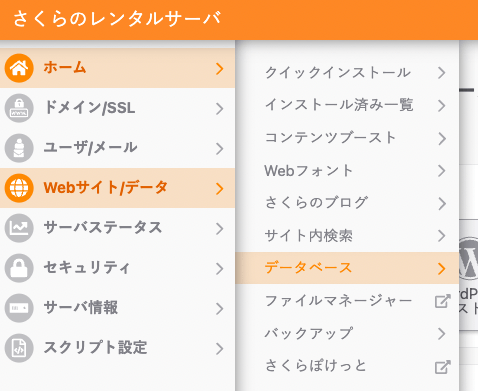
This guide assumes the use of Sakura Rental Server. If you are using a different server, please adapt the instructions accordingly. Creating a Database On Sakura Rental Server, create a new database as follows. Installing Omeka Classic Connect to Sakura Rental Server via SSH. The command looks like the following, where xxxx is your username. ssh xxxx@xxxx.sakura.ne.jp In this case, we will install a new Omeka Classic at the following path. ...

March 22, 2022 · 3 min · Nakamura

Created a Summary Article and Zenn Book Explaining How to Use Omeka.net (Classic)

This explains how to use Omeka.net (Classic). From Chapter 3 onwards, the usage is common with Omeka Classic. I created two types: a summary article on Hatena Blog and a Zenn book. Zenn https://zenn.dev/nakamura196/books/a06c31c1cc3c37 Hatena Blog https://nakamura196.hatenablog.com/entry/2022/03/22/232710 I hope this serves as a useful reference for using Omeka.net (Classic).

March 22, 2022 · Updated: March 22, 2022 · 1 min · Nakamura

[Summary Article] How to Use Omeka.net (Classic)

This explains how to use Omeka.net. Chapters 3 and beyond are common with Omeka Classic usage. Creative Commons - BY – 2014 Use Case: Scholars, Omeka.net, http://info.omeka.net/omeka-net-help/use-case-scholars/ (Translation & Revision: Satoru Nakamura) — - Chapter 1 Overview - Chapter 2 Sign Up and Plan Selection - Chapter 3 Adding Items - Chapter 4 Managing Tags - Chapter 5 Exhibit Builder - Chapter 6 Simple Pages - Chapter 7 Managing Users

March 22, 2022 · 1 min · Nakamura

[Google Colab] Retrieving Article Lists Using the Hatena Blog AtomPub API

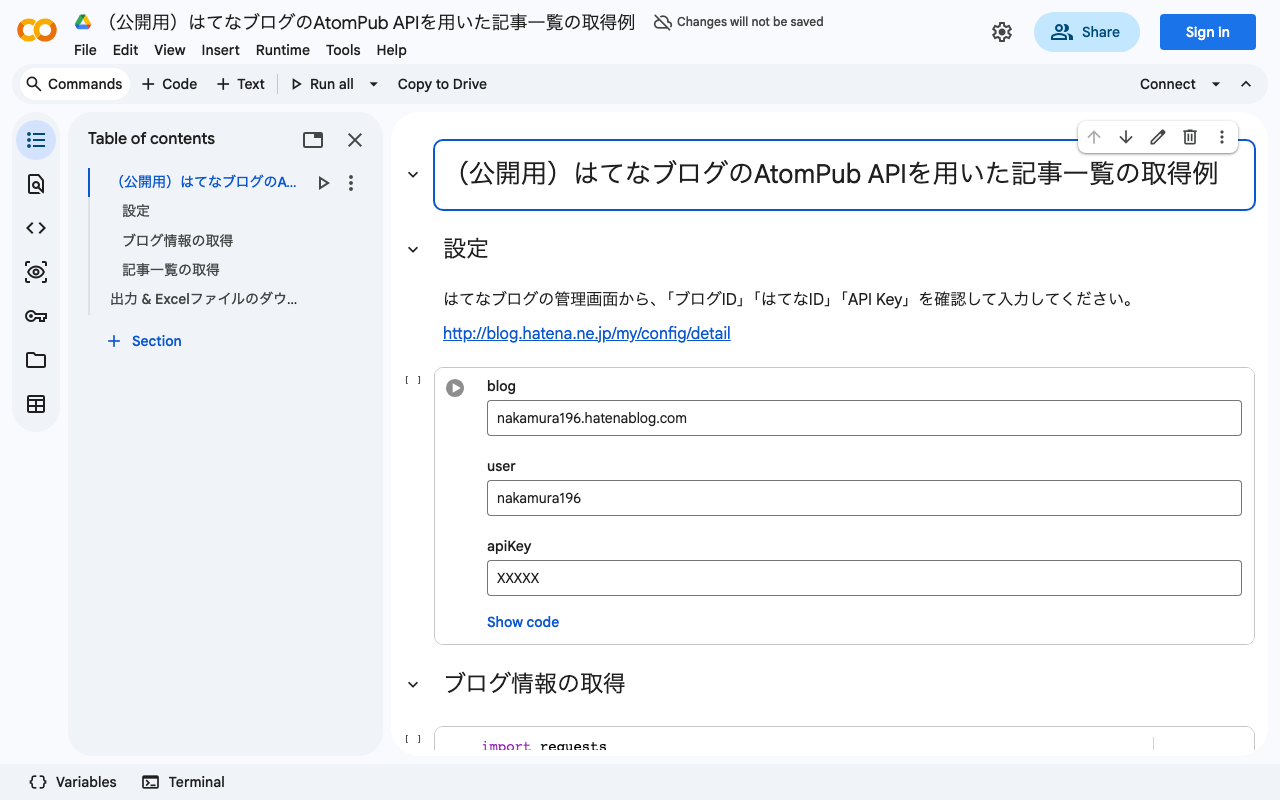
I created a sample program for retrieving article lists using the Hatena Blog AtomPub API. You can try it on the following Google Colab. https://colab.research.google.com/drive/15z0Iime9Bbma7HW09__Fq_fRkcWP6nyS?usp=sharing After running the above program, an Excel file like the following will be downloaded. https://docs.google.com/spreadsheets/d/14myDqZTxocwOT0Mw3ZzKLO81E6r15R-49oUh2dG9Rbo/edit?usp=sharing The “metadata” sheet stores blog information, and the “items” sheet stores the list of articles. Some aspects may be unclear due to the notation in column A of the “metadata” sheet, the heading rows, and the heading rows of the “items” sheet (which are designed for connection with other applications), but I hope this is helpful when using the Hatena Blog AtomPub API. ...

March 22, 2022 · Updated: March 22, 2022 · 1 min · Nakamura

How to Use a Flask-Based YOLOv5 Model Repository with ECR and AWS App Runner

This article introduces an example of building an object detection API using AWS App Runner and YOLOv5. Amazon ECR I registered the following repository, which publishes a YOLOv5 model using Flask, to the Amazon ECR (Elastic Container Registry) public registry. https://github.com/robmarkcole/yolov5-flask https://gallery.ecr.aws/b8m8i5m3/yolov5-flask I made some modifications to the source code from the original repository. The forked repository is here: https://github.com/ldasjp8/yolov5-flask Below, I will explain how to use this image with App Runner as an example. ...

March 21, 2022 · Updated: March 21, 2022 · 1 min · Nakamura

Health Check on Port Issue When Using AWS App Runner + ECR

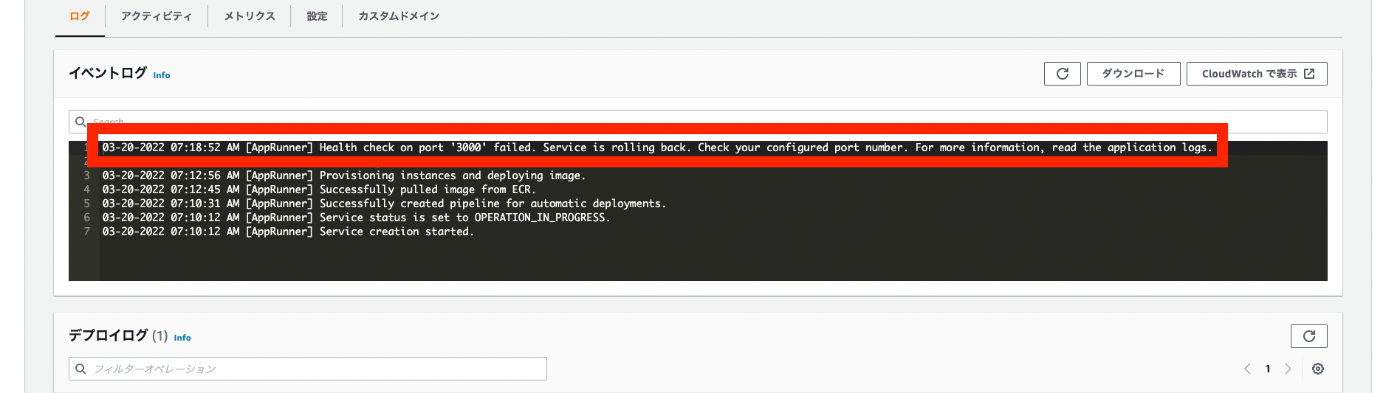
When using ECR as the source in AWS App Runner, the following Health check on port “XXXX” error occurred. 03-20-2022 07:18:52 AM [AppRunner] Health check on port '3000' failed. Service is rolling back. Check your configured port number. For more information, read the application logs. Regarding the above, I checked the “Application logs” as follows. The following was output. exec user process caused: exec format error Regarding the above, I found the following Stack Overflow post. ...

March 20, 2022 · Updated: March 20, 2022 · 1 min · Nakamura