Connecting Drupal with Amazon OpenSearch Service

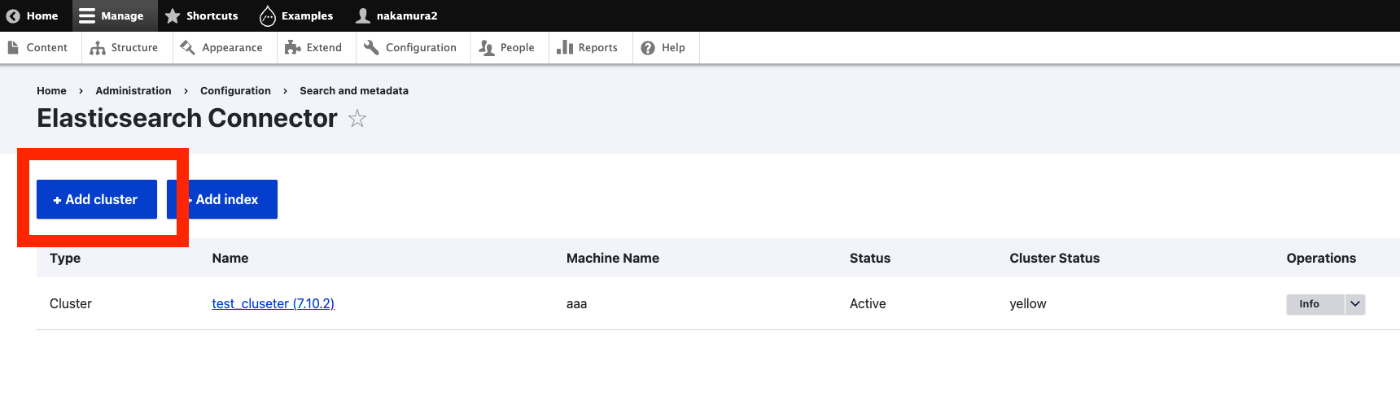
Overview I had the opportunity to connect Drupal with Amazon OpenSearch Service, so this is a personal note for future reference. The following article was helpful. https://www.acquia.com/jp/blog/intergration-with-drupal-and-elasticsearch Module Installation In addition to drupal/search_api and drupal/elasticsearch_connector, it was necessary to install nodespark/des-connector. (There may be room for improvement in how version specifications are handled.) composer require "nodespark/des-connector:^7.x-dev" composer require 'drupal/search_api:^1.29' composer require "drupal/elasticsearch_connector ^7.0@alpha" Then, enable them with the following. drush pm:enable search_api elasticsearch_connector Connecting Drupal to Elasticsearch Cluster Access the following. ...

April 13, 2023 · 3 min · Nakamura

Trying GraphQL with Drupal

Overview I tried GraphQL with Drupal, so this is a personal note for future reference. The following document was helpful. https://drupal-graphql.gitbook.io/graphql/ This assumes Drupal installed on Amazon Lightsail. Module Installation Install the following module. https://www.drupal.org/project/graphql However, it was necessary to install the following module beforehand. https://www.drupal.org/project/typed_data As a result, the installation was completed with the following commands. cd /home/bitnami/stack/drupal composer require 'drupal/typed_data:^1.0@beta' composer require 'drupal/graphql:^4.4' Module Installation from GUI I checked all three related modules below and installed them. ...

April 12, 2023 · 1 min · Nakamura

Adding GraphQL to Strapi

Overview In the following article, I launched Strapi on Amazon Lightsail. This time, I add GraphQL and try using it. Installing the GraphQL Plugin I ran the following. Please adjust paths like backend as needed. cd /opt/bitnami/apache2/htdocs/backend yarn add @strapi/plugin-graphql Then, start the application. yarn develop Accessing /graphql displays the following screen. I had already created a content type called services with a field called title. So by issuing the following query, I was able to retrieve the list and metadata. ...

April 12, 2023 · 1 min · Nakamura

Bug Fixes and Feature Additions to the NDL Classical Book OCR Tutorial Using Google Colab

Overview I have been creating a tutorial for the NDL “Classical Book” OCR application using Google Colab, as introduced in the following article. This time, the following updates were made. Added terms of use Fixed bugs Added support for IIIF Presentation API v3 manifest file input The updated notebook can be accessed at the same URL as before. https://colab.research.google.com/github/nakamura196/ndl_ocr/blob/main/NDL古典籍OCRの実行例.ipynb Terms of Use Please use the notebook itself under CC0. However, the “NDL Classical Book OCR Application” is released by the National Diet Library under the CC BY 4.0 license, so please include the appropriate credit. Also, please check the terms of use for the materials to which OCR is applied. ...

April 12, 2023 · 1 min · Nakamura

Creating IIIF Presentation API v3 Manifest Files Using Omeka S

Overview I needed to create IIIF Presentation API v3 manifest files, so I will introduce how to create them using Omeka S. Installing Omeka S and the IIIF Server Module Please install by referring to the following resource. https://zenn.dev/nakamura196/books/f4f87f9730e12e Creating Items in Omeka S This time, we will use the following image published by the National Diet Library. https://dl.ndl.go.jp/api/iiif/2585098/R0000003/full/full/0/default.jpg Create a new item and give it an appropriate title. ...

April 12, 2023 · 2 min · Nakamura

Registering Taxonomies and Adding Them to Content in Drupal Using Python

Overview This is a continuation of the following series. This time, we will register taxonomies and add them to content. Registering Taxonomies A taxonomy called ne_class was created in advance through the GUI. It can be listed at the following URL. /jsonapi/taxonomy_term/ne_class Below is the program for registering a new taxonomy. Please configure host, username, and password as appropriate. payload = { "data": { "type": "taxonomy_term--ne_class", "attributes": { "name": "干瀬", } } } _type = "ne_class" url = f"{host}/jsonapi/taxonomy_term/{_type}" r = requests.post(url, headers=headers, auth=(username, password), json=payload) r.json() The following result is obtained. ...

April 11, 2023 · 2 min · Nakamura

Updating and Deleting Drupal Content Using Python

Overview In the following article, I described how to create new content. This time, I’ll try updating and deleting existing content. Filtering Items With the following program, you can retrieve registered content. This time, I retrieved content with the title “Pre-update title.” res["data"] is an array. username = "xxx" password = "xxx" host = "xxx" query = { "title": "更新前のタイトル" } item_type = "article" filters = [] for key, value in query.items(): filters.append(f'filter[{key}]={value}') filter_str = '&'.join(filters) endpoint = f'{host}/jsonapi/node/{item_type}?{filter_str}' r = requests.get(endpoint, headers=headers, auth=(username, password)) res = r.json() len(res['data']) Getting the ID of the Content to Update An ID like 730f844d-b476-4485-8957-c33fccb7f8ac is obtained. ...

April 11, 2023 · 1 min · Nakamura

Adding Content to Drupal Using Python

Overview I had an opportunity to add content to Drupal using Python, so this is a memo of the process. I referenced the following article. https://weimingchenzero.medium.com/use-python-to-call-drupal-9-core-restful-api-to-create-new-content-9f3fa8628ab4 Preparing Drupal I set it up on Amazon Lightsail. The following article is a useful reference. https://annai.co.jp/article/use-aws-lightsail Modules Install the following modules. HTTP Basic Auth JSON:API RESTful Web Services Serialization Changing JSON:API Settings Access the following page to change the settings. </admin/config/services/jsonapi> Python Set {IP address or domain name} and {password} as appropriate. ...

April 11, 2023 · 2 min · Nakamura

Running Strapi on Amazon Lightsail (SSL, Custom Domain)

Overview I had the opportunity to run Strapi on Amazon Lightsail, so here are my notes. I referenced the following article: https://zenn.dev/holykzm/articles/1e54cc25207657 Instance Select Node.js. Choose an instance with at least 1GB of memory. If you build on Lightsail, an out-of-memory error will occur with less. SSL and Custom Domain Please refer to the following: https://zenn.dev/nakamura196/articles/5772d6c918508a#独自ドメインの付与 Assign a Static IP, configure a custom domain in Route 53, and run the following: ...

April 11, 2023 · 2 min · Nakamura

[Omeka S Theme Development] Updated the Bootstrap 5 Omeka S Theme

We have published an Omeka S theme using Bootstrap 5 at the following location. https://github.com/ldasjp8/Omeka-S-theme-Bootstrap5 Based on suggestions we received, we added creation date/update date as shown below. Additionally, as Omeka S version 4 has been released as shown below, we made it compatible. https://forum.omeka.org/t/omeka-s-version-4-0-0/16502 However, since there were methods that could not be used in common between version 3 and version 4 during the update, we created separate releases for version 3 and version 4. ...

April 10, 2023 · 1 min · Nakamura

I Created Digital Archive Tools Centered on IIIF

Overview I created digital archive tools centered on IIIF. You can try them at the following URL. https://nakamura196.github.io/viewer/ Currently, two features are provided: Image comparison using Mirador 3 Canvas number specification tool Image Comparison Using Mirador 3 https://nakamura196.github.io/viewer/input Specify the URLs of the manifest files or Canvas URIs you want to compare. Please try the examples provided. You can compare images as shown below. Canvas Number Specification Tool https://nakamura196.github.io/viewer/canvas ...

April 6, 2023 · 1 min · Nakamura

Creating RDF from Excel

Overview For creating RDF data, I prototyped a Python library that converts data created in Excel to RDF data. It is still a work in progress, but here are my notes. Notebook You can try it from the following notebook. https://colab.research.google.com/github/nakamura196/ndl_ocr/blob/main/ExcelからRDFデータを作成する.ipynb Source Excel Data Create an Excel file like the following. https://docs.google.com/spreadsheets/d/16SufG69_aZP0u0Kez8bisImGvVb4-z990AEPesdVxLo/edit#gid=0 In the above example, the prefix information used is organized in a sheet named “prefix.” The actual data is entered in a sheet named “target.” Referencing the specifications of Omeka S’s Bulk Import, language labels like “@ja” and types like “^^uri” are specified. ...

April 3, 2023 · 1 min · Nakamura

Trying to Create a ShEx File

Overview ShEx is described on Wikipedia as: Shape Expressions is a data modeling language for validating and describing Resource Description Framework Here are my notes from attempting to create a ShEx file. Creating a ShEx File This time, we start with RDF data in data/tmp/merged.ttl. We use shexer to create a ShEx file from the RDF data. pip install shexer Get the list of classes in the RDF data. ...

April 3, 2023 · 4 min · Nakamura

Obtaining Persistent Identifiers with w3id.org and Redirecting to Snorql

Overview I created the following page for publishing RDF data. https://sukilam-educational-metadata.github.io/ In particular, from the following page, you can search RDF data using SPARQL and Snorql. For Snorql, I am using “Snorql for Japan Search”. Please try the query examples at the bottom of the page. https://sukilam-educational-metadata.github.io/snorql/ When publishing this page, I obtained persistent identifiers using w3id.org and set up redirects to Snorql, so this is a personal note for future reference. ...

April 2, 2023 · 2 min · Nakamura

Bidirectional Interaction Between Vue 3 and Babylon.js (Part 2)

Overview In the following article, I created a program for interaction between Vue 3 and Babylon.js. This time, as an advanced version of the above, the mesh to be passed to the scene is specified from Vue. You can check the content at the following link. (There are some parts where meshes are not properly deleted. This is planned to be fixed in the future.) https://youtu.be/-dyQp-QX42I Demo Site https://nakamura196.github.io/nuxt3-babylonjs/10 ...

March 29, 2023 · 1 min · Nakamura

Loading .glb Files with Nuxt3 x babylon.js

Overview I encountered an error when attempting to load a .glb file in Nuxt3 x babylon.js, so this is a memo of how I resolved it. Error Details The following error occurred: Unable to load from ./models/test.glb: importScene of undefined from undefined version: undefined, exporter version: undefinedimportScene has failed JSON parse Solution The issue was resolved by additionally installing the following package: npm install @babylonjs/loaders As a result, I was able to display the model with the following JavaScript file: ...

March 29, 2023 · 1 min · Nakamura

Bidirectional Interaction Between Vue 3 and Babylon.js

Overview I prototyped a program for bidirectional interaction between Vue 3 and Babylon.js. You can check the content at the following link. https://youtube.com/shorts/BIdj-3T2_z8 Demo Site https://nakamura196.github.io/nuxt3-babylonjs/9 Source Code https://github.com/nakamura196/nuxt3-babylonjs/blob/main/pages/9/index.vue Summary We hope this serves as a useful reference.

March 29, 2023 · 1 min · Nakamura

Changing Annotation Colors in IIIF Curation Viewer

Overview I received a request to change the colors of annotations added in IIIF Curation Viewer, so I will introduce one method for doing so. The types of annotation markers are documented at the following link: http://codh.rois.ac.jp/software/iiif-curation-viewer/annotation.html#マーカーの種類 While it is possible to manually or programmatically modify the JSON data, this time I will introduce a method using a GUI. Video I recorded a video of the workflow. Please use it as a reference. The example uses “Night Parade of One Hundred Demons” (held by the University of Tokyo General Library). ...

March 28, 2023 · 2 min · Nakamura

Web Application for NDL Classical Book OCR Using Hugging Face Space

Overview I created a web application for NDL Classical Book OCR using Hugging Face Space. You can try it at the link below. Upload an image, and after about 1 minute, the OCR result text and JSON data will be displayed. https://huggingface.co/spaces/nakamura196/ndl_kotenseki_ocr The following article was used as a reference for creating this application. https://qiita.com/relu/items/e882e23a9bd07243211b Choosing the Right Tool I have separately prepared a Google Colab tutorial as another environment for trying NDL Classical Book OCR. ...

March 27, 2023 · 2 min · Nakamura

Running NDL Classical Japanese OCR on Amazon EC2 CPU Environment

Overview This is a memo of running NDL Classical Japanese OCR on an Amazon EC2 CPU environment. The advantage is that it can be run without preparing an expensive GPU environment, but please note that it takes about 30 seconds to 1 minute per image. The following article was referenced when building this environment. https://qiita.com/relu/items/e882e23a9bd07243211b Instance Select Ubuntu from Quick Start. For the instance type, I recommend t2.medium or higher. Errors occurred with smaller instances. ...

March 27, 2023 · 2 min · Nakamura