Creating an Anonymous File Uploader Using Google Drive and Google Apps Script

Overview I had the opportunity to create an anonymous file uploader using Google Drive and Google Apps Script, so this is a memo of the process. I referenced the following article. https://qiita.com/v2okimochi/items/06ed1ce7c56a877a1e10 Creating the Web App First, access Apps Script from the following URL. https://script.google.com/ Click “New project.” The following screen will be displayed. Copy and paste the following code. For the second line, <Google Drive upload folder ID>, create an upload folder in Google Drive in advance and obtain its ID. ...

May 11, 2023 · 3 min · Nakamura

Sending Google Spreadsheet Update Notifications to GitHub

Overview I investigated how to send notifications to GitHub when a Google Spreadsheet is updated using Google Apps Script. I also looked into how to send notifications from Strapi and Contentful to GitHub, so I am recording this as a reference. Google Apps Script By preparing a script like the following, I was able to send spreadsheet update notifications to GitHub. const token = "ghp_xxx" const owner = "yyy" const repo = "zzz" const event_type = "aaa" function postSheetChange() { const headers = { "Accept": "application/vnd.github+json", "Authorization": `Bearer ${token}`, "Content-Type": "application/json" } var payload = JSON.stringify({ event_type }); var requestOptions = { method: 'POST', headers, payload, }; UrlFetchApp.fetch(`https://api.github.com/repos/${owner}/${repo}/dispatches`, requestOptions) } The following article was helpful for setting up triggers. ...

April 27, 2023 · 2 min · Nakamura

Auth0 Provider and Strapi Tutorial

Overview I tried authenticating Strapi using Auth0. I was able to accomplish this by following the steps in the article below. https://strapi.io/blog/auth0-provider-and-strapi-tutorial-1 However, in the section specifying Allowed Callback URLs, I needed to change http://localhost:1337/connect/auth0/callback to http://localhost:1337/api/connect/auth0/callback. (Reference) GitHub Following the above steps as a reference, I was also able to successfully configure GitHub as a provider.

April 24, 2023 · 1 min · Nakamura

Fixing TypeError: array_keys()... in Drupal

The following error occurred in the graphql module. The website encountered an unexpected error. Please try again later. TypeError: array_keys(): Argument #1 ($array) must be of type array, null given in array_keys() (line 40 of /bitnami/drupal/modules/contrib/graphql/graphql.install). I fixed the source code referring to the following article. https://www.drupal.org/project/google_tag/issues/3319621 Specifically, by rewriting as follows, the error was resolved. // $negotiation = $languageTypes->get('negotiation'); $negotiation = $languageTypes->get('negotiation') ?? []; This should be fixed in the latest version, but we hope this is helpful for anyone encountering a similar error. ...

April 24, 2023 · 1 min · Nakamura

Drupal: An Example of Searching Nested Fields

Overview In the following article, I investigated how to search nested fields using Strapi. This time, I will investigate how to do the same thing with Drupal. For this investigation, Book and Author content has already been registered in the following article. The following article was helpful for filtering methods. https://www.drupal.org/docs/core-modules-and-themes/core-modules/jsonapi-module/filtering Search Examples The following searches are performed against: /jsonapi/node/book? Search for books containing an author with hobby=dance SHORT filter[field_authors.field_hobby]=dance ...

April 24, 2023 · 2 min · Nakamura

Drupal: Example of Bulk Registration and Updates Using Feeds

Overview In the following article, I investigated search methods for nested fields using Strapi. This time, as a preparation for doing the same thing in Drupal, this is a note on how to perform bulk registration and updates of content. To set up a structure similar to the above article, we will work with two content types: Book and Author. Creating Content Types Create the Book and Author content types. ...

April 23, 2023 · 2 min · Nakamura

Strapi: How to Filter Results by Deeply Nested Fields

Overview The following article introduces how to filter results by deeply nested fields. https://strapi.io/blog/deep-filtering-alpha-26 As described above, by preparing the content types and fields, I was able to obtain the intended results. Notes As mentioned in the comments of the above article, the text contains “" characters, but these appear to be unnecessary. Incorrect GET /api/books?filters\[authors\][hobby][$contains]=dance By using the query without “" as follows, the intended results were obtained. Correct GET /api/books?filters[authors][hobby][$contains]=dance Summary I hope this serves as a helpful reference. ...

April 22, 2023 · 1 min · Nakamura

Drupal: Adding Content Types and Fields Using Custom Modules

Overview This is a memo on how to add content types and fields using Drupal custom modules. The following two articles were helpful. https://www.drupal.org/docs/drupal-apis/entity-api/creating-a-custom-content-type-in-drupal-8 https://www.digitalnadeem.com/drupal/how-to-create-content-type-fields-and-view-while-installing-custom-module-in-drupal-9-using-configuration-manager/ Car Brand Example Following the first article introduced above, I was able to add a content type “Car Brand” with a “body” field. Note that the above article skips the part about creating the custom module. First, create the following folder and file. name: foobar description: Sample module package: Custom type: module version: 1.0 core_version_requirement: ^8 || ^9 Adding Custom Fields Using the above as reference, I was able to add a content type, but to add custom fields, I needed to add both a Field and a Field storage. ...

April 21, 2023 · 3 min · Nakamura

Drupal: Linking Content of Different Content Types to Each Other

Overview I investigated how to link content of different content types to each other, and here are my notes. Specifically, as shown below, item 1 is connected to a content item called image 1 through a field called iiif_image2. The goal is to add a link to item 1 on the image 1 page. I referenced the following article for this implementation. https://drupal.stackexchange.com/questions/255447/view-for-entity-reference-reverse-backwards-forwards Method Adding a View Navigate to /admin/structure/views and click “+ Add view” ...

April 20, 2023 · 2 min · Nakamura

Checking ORCID RDF Data

Here is how to check the RDF data of ORCID. The following ORCID ID is used as the target. https://orcid.org/0000-0001-8245-7925 For browsing, I use the Linked Data Browser developed by Masahide Kanzaki. https://www.kanzaki.com/works/2014/pub/ld-browser For example, you can browse the RDF data from the following URL. https://www.kanzaki.com/works/2014/pub/ld-browser?u=https%3A%2F%2Forcid.org%2F0000-0001-8245-7925 The specific RDF data is as follows. <rdf:RDF xmlns:rdf="http://www.w3.org/1999/02/22-rdf-syntax-ns#" xmlns:owl="http://www.w3.org/2002/07/owl#" xmlns:prov="http://www.w3.org/ns/prov#" xmlns:pav="http://purl.org/pav/" xmlns:rdfs="http://www.w3.org/2000/01/rdf-schema#" xmlns:gn="http://www.geonames.org/ontology#" xmlns:foaf="http://xmlns.com/foaf/0.1/" xmlns:xsd="http://www.w3.org/2001/XMLSchema#"> <foaf:PersonalProfileDocument rdf:about="http://pub.orcid.org/orcid-pub-web/experimental_rdf_v1/0000-0001-8245-7925"> <pav:createdOn rdf:datatype="http://www.w3.org/2001/XMLSchema#dateTime" >2017-07-14T00:27:17.421Z</pav:createdOn> <prov:generatedAtTime rdf:datatype="http://www.w3.org/2001/XMLSchema#dateTime" >2022-12-14T02:40:04.693Z</prov:generatedAtTime> <pav:lastUpdateOn rdf:datatype="http://www.w3.org/2001/XMLSchema#dateTime" >2022-12-14T02:40:04.693Z</pav:lastUpdateOn> <pav:createdWith rdf:resource="https://orcid.org"/> <prov:wasAttributedTo> <prov:Person rdf:about="https://orcid.org/0000-0001-8245-7925"> <foaf:account> <foaf:OnlineAccount rdf:about="https://orcid.org/0000-0001-8245-7925#orcid-id"> <rdfs:label>0000-0001-8245-7925</rdfs:label> <foaf:accountName>0000-0001-8245-7925</foaf:accountName> <foaf:accountServiceHomepage rdf:resource="https://orcid.org"/> </foaf:OnlineAccount> </foaf:account> <foaf:publications> <foaf:Document rdf:about="https://orcid.org/0000-0001-8245-7925#workspace-works"/> </foaf:publications> <foaf:page rdf:resource="https://researchmap.jp/nakamura.satoru/?lang=english"/> <foaf:based_near> <gn:Feature> <gn:parentCountry> <rdf:Description rdf:about="http://sws.geonames.org/1861060/"> <gn:name>Japan</gn:name> <gn:countryCode>JP</gn:countryCode> <rdfs:label>Japan</rdfs:label> </rdf:Description> </gn:parentCountry> <gn:countryCode>JP</gn:countryCode> </gn:Feature> </foaf:based_near> <foaf:familyName>Nakamura</foaf:familyName> <foaf:givenName>Satoru</foaf:givenName> <rdfs:label>Satoru Nakamura</rdfs:label> <rdf:type rdf:resource="http://xmlns.com/foaf/0.1/Person"/> </prov:Person> </prov:wasAttributedTo> <pav:createdBy rdf:resource="https://orcid.org/0000-0001-8245-7925"/> <foaf:maker rdf:resource="https://orcid.org/0000-0001-8245-7925"/> <foaf:primaryTopic rdf:resource="https://orcid.org/0000-0001-8245-7925"/> </foaf:PersonalProfileDocument> </rdf:RDF> I hope this is helpful as a reference. ...

April 20, 2023 · 1 min · Nakamura

Drupal: Creating Custom REST Resources

Overview I created a custom REST resource by following the instructions below. https://www.drupal.org/docs/drupal-apis/restful-web-services-api/custom-rest-resources By following the above article, I was able to obtain a JSON result from the following URL. /demo_rest_api/demo_resource { "message": "Hello, this is a rest service" } REST UI Module The above article included the following note: If you are using the REST UI contrib module, you should now be able to see it in the list of available endpoints and you should be able to configure the GET method. ...

April 20, 2023 · 2 min · Nakamura

Creating a Custom API Using Drupal's RESTful Views

Overview This is a memo about creating a custom API using Drupal’s RESTful Views, based on the following article. https://acret.jp/drupal/node/434 In addition to the content of the above article, I also describe how to configure pagination. Creating Views I followed the instructions on the site mentioned above. Enabling Pagination I referenced the following article. https://www.drupal.org/forum/support/post-installation/2015-12-04/rest-export-pagination Select the Views Pager. I set it to Full as shown below. Mini also seemed to work fine. ...

April 20, 2023 · 1 min · Nakamura

Displaying the Total Number of Results in Drupal Views

Overview I looked into how to display the total number of results in Drupal Views, so here is a quick note. The total number of search results is displayed as shown below: Method I referenced the following article: https://ostraining.com/blog/drupal/count-views/ Access the following page: /admin/structure/views/view/content Click the Add button next to Header. Select “Result summary”. Click Apply, then click Save. Summary I hope this serves as a useful reference. ...

April 20, 2023 · 1 min · Nakamura

Adding Google Analytics 4 gtag.js to Omeka S

Overview The following module is available for setting up Google Analytics in Omeka S. https://omeka.org/s/modules/GoogleAnalytics/ As of April 2023, the above module also supports GA4, but as of April 2022, it was not supported as mentioned in the following post. https://forum.omeka.org/t/google-analytics-4-gtag-js/15034 Therefore, the following module was introduced, and I decided to try it. https://omeka.org/s/modules/AnalyticsSnippet/ Note that, as mentioned above, as of April 2023, the first module also supports GA4, so either module can be used for setting up Google Analytics. ...

April 19, 2023 · 1 min · Nakamura

Converting TEI XML to LaTeX Using TEI Critical Apparatus Toolbox

Overview TEI Critical Apparatus Toolbox is “a tool for people preparing a natively digital TEI critical edition.” http://teicat.huma-num.fr/index.php In addition to providing functionality for visualizing critical apparatus information, it offers several other useful features. Among these, I learned that it has a “TEI to LaTeX and PDF conversion” feature, so I decided to try it out. Print an edition Access the following URL. http://teicat.huma-num.fr/print.php Click the link with the text this dummy edition file to download the following sample data. ...

April 19, 2023 · 1 min · Nakamura

Prototype of an XML File Validation Tool Using JPCOAR Schema (v1)

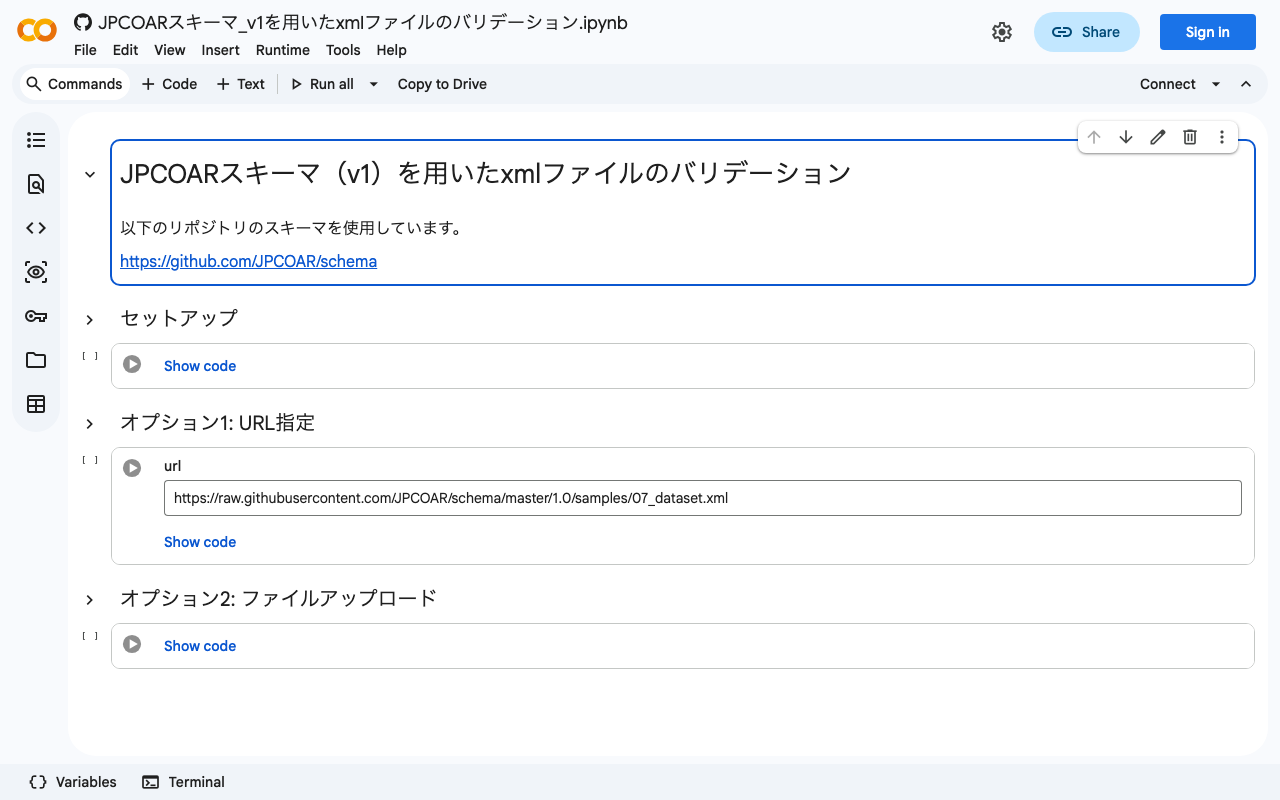
I previously wrote the following article, where I tried validating XML files using the JPCOAR schema. This time, based on the verification from the above article, I created a validation tool using Google Colab. You can try it at the following URL. https://colab.research.google.com/github/nakamura196/ndl_ocr/blob/main/JPCOARスキーマ_v1を用いたxmlファイルのバリデーション.ipynb You can validate target files by specifying the URL of a published XML file or by uploading a local file. I hope this serves as a helpful reference when creating XML files using the JPCOAR Schema (v1). ...

April 19, 2023 · 1 min · Nakamura

Text Selection Using VueUse (Nuxt 3)

Overview This is a personal note on using VueUse for implementing text selection functionality with Nuxt 3 (Vue 3). https://vueuse.org/ Demo You can try it from the following page. https://nuxt3-demo-git-main-nakamura196.vercel.app/textSelection The source code is at the following URL. https://github.com/nakamura196/nuxt3-demo/blob/main/pages/textSelection.vue Installation Method The installation instructions are described on the following page. https://vueuse.org/guide/ The specific steps are as follows. npm i -D @vueuse/nuxt @vueuse/core // nuxt.config.ts export default defineNuxtConfig({ modules: [ '@vueuse/nuxt', ], }) Summary In addition to text selection, there seem to be many other useful features available, so I would like to continue trying them out. ...

April 19, 2023 · 1 min · Nakamura

Search Using Drupal Search API in Next.js for Drupal (Faceted Search, etc.)

Overview I tried Next.js for Drupal. https://next-drupal.org/ By following the “Get Started” guide, I was able to integrate Next.js with Drupal. https://next-drupal.org/learn/quick-start Additionally, the following article introduces an implementation example for faceted search. https://next-drupal.org/guides/search-api This article is my notes specifically on implementing the latter, faceted search. Search API Create a Server and index as follows. The official site provides the following as a reference: https://www.drupal.org/docs/contributed-modules/search-api For a Japanese-language reference: https://www.acquia.com/jp/blog/introduction-to-search-api-1 ...

April 17, 2023 · 2 min · Nakamura

Does Contentful Full-Text Search Require Search Terms of 2 or More Characters?

I am using Contentful, and it appears that search terms of 2 or more characters are required. A query will ignore search tokens with less than 2 characters. https://www.contentful.com/developers/docs/references/content-delivery-api/#/reference/search-parameters/full-text-search-on-a-field This point requires attention when dealing with data that includes Japanese and other languages. Addendum With microCMS, searching from 1 character was possible. https://microcms.io/

April 14, 2023 · 1 min · Nakamura

How to Bulk Delete Content in Drupal

Overview I looked into how to bulk delete content in Drupal, so this is a memo. The following article was helpful. https://www.webwash.net/how-to-bulk-delete-content-in-drupal/ The following three methods were introduced. Using Drupal Core UI Using Drush Using Drupal Views Bulk Operations (VBO) Using Drupal Core UI The following is a translation of the original description. If you have a small Drupal site and fewer than about 300 nodes to delete, you should use this method. This is because the Drupal Core UI only allows deleting 50 nodes at a time by default. As the site grows larger, this becomes tedious. ...

April 14, 2023 · 2 min · Nakamura