Handling CORS Errors with Drupal's JSON:API

Overview When using the output from Drupal’s JSON:API in a separate application, a CORS error occurred. Here, I explain how to resolve the CORS error. Solution Copy the following file: /web/sites/default/default.services.yml cp /web/sites/default/default.services.yml /web/sites/default/services.yml Then, set enabled to true in cors.config: # Configure Cross-Site HTTP requests (CORS). # Read https://developer.mozilla.org/en-US/docs/Web/HTTP/Access_control_CORS # for more information about the topic in general. # Note: By default the configuration is disabled. cors.config: enabled: false # Change this to true! # Specify allowed headers, like 'x-allowed-header'. allowedHeaders: [] As a result, the CORS error was resolved. ...

June 12, 2023 · 1 min · Nakamura

Troubleshooting JSON:API Related Errors

Overview The following JSON:API related error occurred. This is a note on how to resolve it. サイトに予期せぬエラーが起こりました。しばらくたってから再度お試しください。 TypeError: Drupal\jsonapi_search_api_facets\Plugin\facets\facet_source\JsonApiFacets::__construct(): Argument #6 ($index) must be of type Drupal\search_api\IndexInterface, null given, called in /home/j-soken/drupal/web/modules/contrib/jsonapi_search_api/modules/jsonapi_search_api_facets/src/Plugin/facets/facet_source/JsonApiFacets.php on line 61 in Drupal\jsonapi_search_api_facets\Plugin\facets\facet_source\JsonApiFacets->__construct() (line 48 of modules/contrib/jsonapi_search_api/modules/jsonapi_search_api_facets/src/Plugin/facets/facet_source/JsonApiFacets.php). Drupal\jsonapi_search_api_facets\Plugin\facets\facet_source\JsonApiFacets::create() (Line: 21) Drupal\Core\Plugin\Factory\ContainerFactory->createInstance() (Line: 83) Drupal\Component\Plugin\PluginManagerBase->createInstance() (Line: 251) facets_system_breadcrumb_alter() (Line: 545) Drupal\Core\Extension\ModuleHandler->alter() (Line: 94) Drupal\Core\Breadcrumb\BreadcrumbManager->build() (Line: 72) Drupal\system\Plugin\Block\SystemBreadcrumbBlock->build() (Line: 171) Drupal\block\BlockViewBuilder::preRender() call_user_func_array() (Line: 101) ... Solution First, enable error display. Add the following to the configuration file. ...

June 12, 2023 · 1 min · Nakamura

Disable UI: Using Drupal as a Headless CMS

I had the opportunity to use Drupal as a headless CMS and tried the Disable UI module, which restricts UI access to administrators and similar roles. https://www.drupal.org/project/disable_ui As a result, access to the top page was displayed as follows. On the other hand, the enabled JSON:API was accessible to non-logged-in users. /jsonapi/ We hope this serves as a useful reference when using Drupal as a headless CMS.

June 9, 2023 · 1 min · Nakamura

How to Use Drupal JSON:API (include and Multilingual Support)

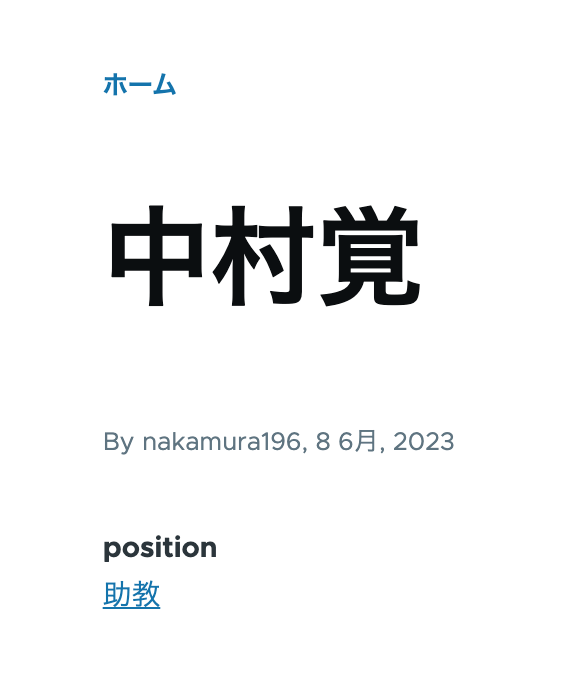
Overview This is a personal note on how to use Drupal’s JSON:API. This time, I will cover the use of include for taxonomies and multilingual processing. Data As shown below, the taxonomy “Assistant Professor” has been assigned to the position field. /node/5 Additionally, content multilingualization is enabled, so the English versions of the title and position are also displayed as shown below. /en/node/5 JSON:API Since the above content was created with the content type “faculty”, the data list can be retrieved from the following URL. ...

June 9, 2023 · 4 min · Nakamura

Content Registration and Multilingual Support Using Drupal Key Auth

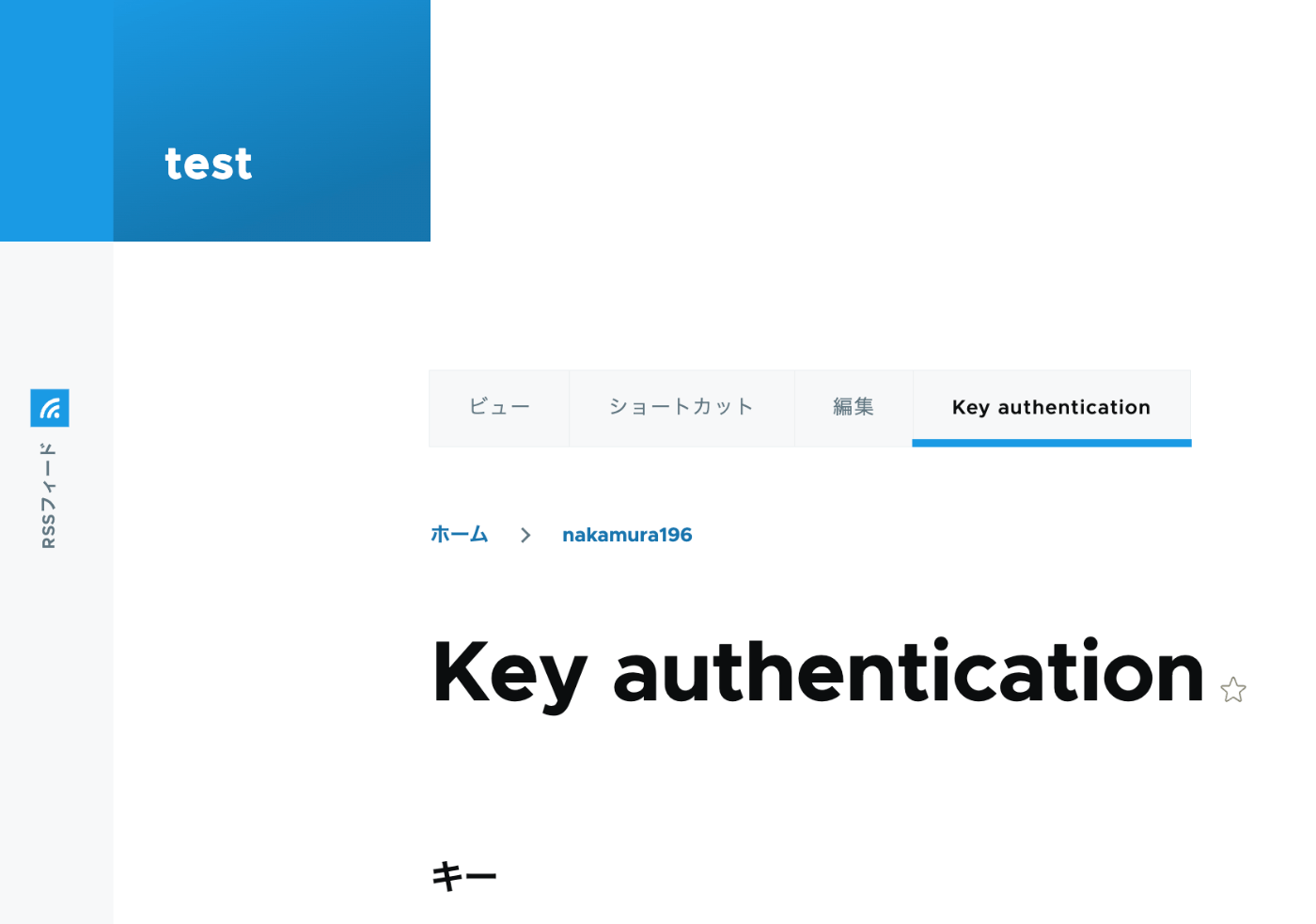
Overview In the following article, I performed content registration using Python with Basic authentication. This time, I tried API Key Authentication, referring to the following article. https://designkojo.com/post-drupal-using-jsonapi-vuejs-front-end API Key Authentication The following module was used. https://www.drupal.org/project/key_auth A “Key authentication” tab appeared on the user edit screen, allowing an API key to be generated. When using the API key, the following program can be used. import requests endpoint = 'http://{IP address or domain name}/jsonapi/node/article' key = '{API key}' headers = { 'Accept': 'application/vnd.api+json', 'Content-Type': 'application/vnd.api+json', "api-key": key } payload = { "data": { "type": "node--article", "attributes": { "title": "What's up from Python", "body": { "value": "Be water. My friends.", "format": "plain_text" } } } } r = requests.post(endpoint, headers=headers, json=payload) r.json() Notes on Multilingual Support As a note, it appears that creating translation data is not supported. ...

June 9, 2023 · 2 min · Nakamura

Trying Wagtail

Overview I tried Wagtail, so here are my notes on issues I encountered. I basically followed the tutorial below: https://docs.wagtail.org/en/v5.0.1/getting_started/tutorial.html Search Feature When I added a page with the Japanese title “My First Article,” the following search did not return any results. http://localhost:8000/admin/pages/search/?q=はじめて On the other hand, the following search did return results. It appeared that partial matching for Japanese is not supported by default. http://localhost:8000/admin/pages/search/?q=はじめての記事 Wagtail API Information about the API is available here: ...

June 9, 2023 · 2 min · Nakamura

Causes and Solutions When Browse Does Not Work in Archivematica

Overview I encountered a bug where clicking Browse in Archivematica did not allow me to view folders or files. Here I introduce the cause and solution. /transfer/ Symptom /administration/storage/ Error retrieving locations: is the storage server running? Please contact an administrator. Accessing the following returned this JSON: /transfer/locations/ { "message": "Error retrieving source directories", "status": "Failure" } Solution Accessing the following showed that the Storage Service was inaccessible. /administration/general/ ...

June 7, 2023 · 1 min · Nakamura

Bulk Deleting Amazon ECR Repositories

Overview I had an opportunity to bulk delete Amazon ECR repositories, so here are my notes. Please exercise caution when running these commands. Creating a List of Repositories I referenced the following article. https://qiita.com/fk_2000/items/bffd3b1ad6f3ab109766 Run the following command. aws ecr describe-repositories --output json | jq -re ".repositories[].repositoryName" > repository.list On macOS, if you don’t have the jq command, install it with brew install jq. Deletion Run the following command. The --force flag is used to delete even if images exist. ...

June 6, 2023 · 1 min · Nakamura

Customizing Views for Custom Models in Django REST Framework JSON:API (DJA)

Overview Let’s customize the views for the model added in the following article. Sort Let’s add ordering_fields. ... class UserInfoViewset(ModelViewSet): ordering_fields = ("user_name", ) # Added here queryset = UserInfo.objects.all() serializer_class = UserInfoSerializer def get_object(self): entry_pk = self.kwargs.get("entry_pk", None) if entry_pk is not None: return Entry.objects.get(id=entry_pk).blog return super().get_object() ... As a result, only user_name became selectable in the “Filters” display. For example, sorting by age returned a validation error. Filter ... class UserInfoViewset(ModelViewSet): queryset = UserInfo.objects.all() serializer_class = UserInfoSerializer ordering_fields = ("user_name", ) # Added from here below # override the default filter backends in order to test QueryParameterValidationFilter # without breaking older usage of non-standard query params like `page_size`. filter_backends = ( QueryParameterValidationFilter, OrderingFilter, DjangoFilterBackend, SearchFilter, ) rels = ( "exact", "iexact", "contains", "icontains", "gt", "gte", "lt", "lte", "in", "regex", "isnull", ) filterset_fields = { "id": ("exact", "in"), "user_name": rels } search_fields = ("user_name", ) ... ... With the above, the following filter became possible. ...

June 5, 2023 · 2 min · Nakamura

Adding Custom Models to Django REST framework JSON:API (DJA)

Overview In the following article, I confirmed the basic operations of Django REST framework JSON:API (DJA). In this article, I will try adding a custom model to DJA. References I will add a UserInfo model, referencing the following article. https://tech-blog.rakus.co.jp/entry/20220329/python Steps Define the Model Add the following: # ユーザ情報を格納する class UserInfo(BaseModel): user_name = models.CharField(verbose_name='ユーザ名',max_length=32) # ユーザ名 birth_day = models.DateField(verbose_name='生年月日') # 生年月日 age = models.PositiveSmallIntegerField(verbose_name='年齢',null=True,unique=False) # 年齢 created_at = models.DateTimeField(verbose_name='作成日時',auto_now_add=True) Build the Database Execute the following: % django-admin makemigrations --settings=example.settings Migrations for 'example': example/migrations/0013_userinfo.py - Create model UserInfo % django-admin migrate --settings=example.settings Operations to perform: Apply all migrations: auth, contenttypes, example, sessions, sites Running migrations: Applying example.0013_userinfo... OK For reference, the following file is created: ...

June 5, 2023 · 2 min · Nakamura

Trying Django REST Framework JSON:API (DJA)

Overview I had an opportunity to try Django REST framework JSON:API (DJA), so here are my notes. https://django-rest-framework-json-api.readthedocs.io/en/stable/index.html Installation Launch the example app described on the following page. https://django-rest-framework-json-api.readthedocs.io/en/stable/getting-started.html git clone https://github.com/django-json-api/django-rest-framework-json-api.git cd django-rest-framework-json-api python3 -m venv env source env/bin/activate pip install -Ur requirements.txt django-admin migrate --settings=example.settings django-admin loaddata drf_example --settings=example.settings django-admin runserver --settings=example.settings As a result, the following screens were obtained. http://localhost:8000 for the list of available collections (in a non-JSON:API format!), ...

June 5, 2023 · 2 min · Nakamura

Specifying the ImageMagick Path When Installing Omeka S on Sakura Rental Server

Overview When installing Omeka S on Sakura Rental Server, it was necessary to specify the ImageMagick path. Modify the configuration file as follows. <?php return [ 'logger' => [ 'log' => false, 'priority' => \Laminas\Log\Logger::NOTICE, ], 'http_client' => [ 'sslcapath' => null, 'sslcafile' => null, ], 'cli' => [ 'phpcli_path' => null, ], 'thumbnails' => [ 'types' => [ 'large' => ['constraint' => 800], 'medium' => ['constraint' => 200], 'square' => ['constraint' => 200], ], 'thumbnailer_options' => [ 'imagemagick_dir' => '/usr/local/bin', # Modify this line ], ], 'translator' => [ 'locale' => 'en_US', ], 'service_manager' => [ 'aliases' => [ 'Omeka\File\Store' => 'Omeka\File\Store\Local', 'Omeka\File\Thumbnailer' => 'Omeka\File\Thumbnailer\ImageMagick', ], ], ];

May 30, 2023 · 1 min · Nakamura

Creating a REST API Using OpenAPI and AWS CDK (OpenSearch Connection and Custom Domain)

Overview I had the opportunity to create a REST API using OpenAPI and AWS CDK, so this is a memo. The following article was very helpful. https://zenn.dev/taroman_zenn/articles/91879cec40627c The project created this time is published in the following repository. https://github.com/nakamura196/CdkOpenapi Connecting to OpenSearch The implementation is done in the following Lambda. https://github.com/nakamura196/CdkOpenapi/blob/main/lambda/search.ts Environment variables need to be passed to the Lambda, and the following was written in the ts file under lib. ...

May 26, 2023 · 1 min · Nakamura

Integrating Strapi with Amazon OpenSearch

Overview The following article was helpful for integrating Strapi with Elasticsearch. https://punits.dev/blog/integrating-elasticsearch-with-strapi/ The source code is also publicly available. https://github.com/geeky-biz/strapi-integrate-elasticsearch Here, I will note some customizations made based on the above article, including integration with Amazon OpenSearch. The customized source code is available here: https://github.com/nakamura196/strapi-integrate-opensearch Modifications The article references indexing_type, but it needed to be changed to indexing_request_type. https://github.com/nakamura196/strapi-integrate-opensearch/blob/006c533d4d7882fc9779552db31a7b0e2ada5e57/elastic/cron-search-indexing.js#L16 Additionally, to use Amazon OpenSearch instead of Elasticsearch, the following libraries need to be installed. ...

May 26, 2023 · 1 min · Nakamura

Configuring Strapi's REST API

Overview This is a memo on some configuration settings for Strapi’s REST API. Changing the Search Result Limit The following documentation describes this. https://docs.strapi.io/dev-docs/api/rest/sort-pagination#pagination Specifically: The default and maximum values for pagination[limit] can be configured in the ./config/api.js file with the api.rest.defaultLimit and api.rest.maxLimit keys. module.exports = { rest: { defaultLimit: 25, maxLimit: 1000, // 100, withCount: true, }, }; Retrieving Items Including Those with Draft STATE By default, items with a Draft STATE could not be retrieved. The following article was helpful. ...

May 26, 2023 · 1 min · Nakamura

Creating PDF Files from IIIF Manifest Files

Overview I had the opportunity to create PDF files from IIIF manifest files. As a solution, I found the following repository, but was unable to get it working. https://github.com/jbaiter/pdiiif While the above repository uses JavaScript, this time I created a conversion tool using Python. Usage You can try it from the following notebook. https://colab.research.google.com/github/nakamura196/ndl_ocr/blob/main/iiif2pdf.ipynb During the initial installation, img2pdf is installed, but due to PIL version dependencies, a “RESTART RUNTIME” button will appear. Please click it and then re-run the same cell. ...

May 26, 2023 · 1 min · Nakamura

How to Upload and Update Files Using the GitHub GUI

Overview I had the opportunity to share how to upload and update files on GitHub. Login For creating a new account and logging in, please refer to the following article: https://reffect.co.jp/html/create_github_account_first_time File Upload Access the repository. Click the “Add file” button, then click “Upload files.” Click “choose your files” to upload files from your local machine, then press “Commit changes.” The files will be uploaded. If a file with the same name already exists, it will be overwritten. ...

May 25, 2023 · 1 min · Nakamura

About the Image Server Configuration for Omeka S

Overview The Image Server for Omeka S is a module that enables image delivery compatible with the IIIF Image API. https://omeka.org/s/modules/ImageServer/ When used in combination with the IIIF Server module, it also enables delivery via IIIF manifests. The Image Server module allows various settings, including methods for creating tile images. This article shares the investigation results regarding these settings. Experimental Environment This time, I will use an Amazon Lightsail LAMP instance. I use a relatively low-spec environment with 2 GB RAM and 1 vCPU. ...

May 25, 2023 · 4 min · Nakamura

AWS CDK x CloudFront x S3 x Basic Auth x index.html Support x Custom Domain

Overview I used AWS CDK to create a static site with CloudFront + S3. Additionally, I used CloudFront Functions to add Basic authentication and processing to append index.html to requests that do not include a filename or extension in the URL. I also added a custom domain, so this is a memo of the process. While somewhat incomplete, the source code is available in the following repository. https://github.com/nakamura196/staticBasic The intended use is to prepare an .env file like the following and run cdk deploy. ...

May 16, 2023 · 3 min · Nakamura

How to Register IIIF Images as Media in Omeka S

Overview This article introduces how to register IIIF images as media in Omeka S. Images published on external IIIF image servers can be registered in Omeka S. The official manual describes this at the following page. https://omeka.org/s/docs/user-manual/content/items/#media Specific Method In the media registration screen of the item edit page, enter values as shown below. You need to enter a URL ending with /info.json. The following uses the National Diet Library’s Koui Genji Monogatari as an example. ...

May 15, 2023 · 1 min · Nakamura