Cantaloupe: Serving Images Stored in Amazon S3

Overview This is a note on how to serve images stored in Amazon S3 using Cantaloupe Image Server, one of the IIIF image servers. As an alternative method for serving images stored in Amazon S3, I also introduced an approach in the following article. (The tools may have been updated since the article was written, so the instructions may not work exactly as described.) Configuration The official manual is available at the following link. ...

November 16, 2023 · 2 min · Nakamura

Drupal: Registering Multiple Values and Skip Processing Using the Feeds Tamper Module

Overview I attempted to register a CSV like the following using Drupal’s Feeds module. id title target xxx aaa 9600023 When you want to register multiple values in a single field like this, the Feeds Tamper module can be used. https://www.drupal.org/project/feeds_tamper The following article was helpful. https://acret.jp/drupal/articles/456 By configuring as follows, I was able to batch register multiple values. However, when the target column contains empty rows like the following, ...

November 13, 2023 · 1 min · Nakamura

Drupal: Displaying UUIDs

Overview This is a note on how to display UUIDs for content, as shown below. Module Installation The following module was used. https://www.drupal.org/project/uuid_extra Usage Select the “Manage display” tab for the content type where you want to display UUIDs, and move the UUID field as shown below. Summary I hope this serves as a useful reference.

November 13, 2023 · 1 min · Nakamura

TEI Publisher: Visualization Examples from the TEI Publisher Demo Collection (Part 1)

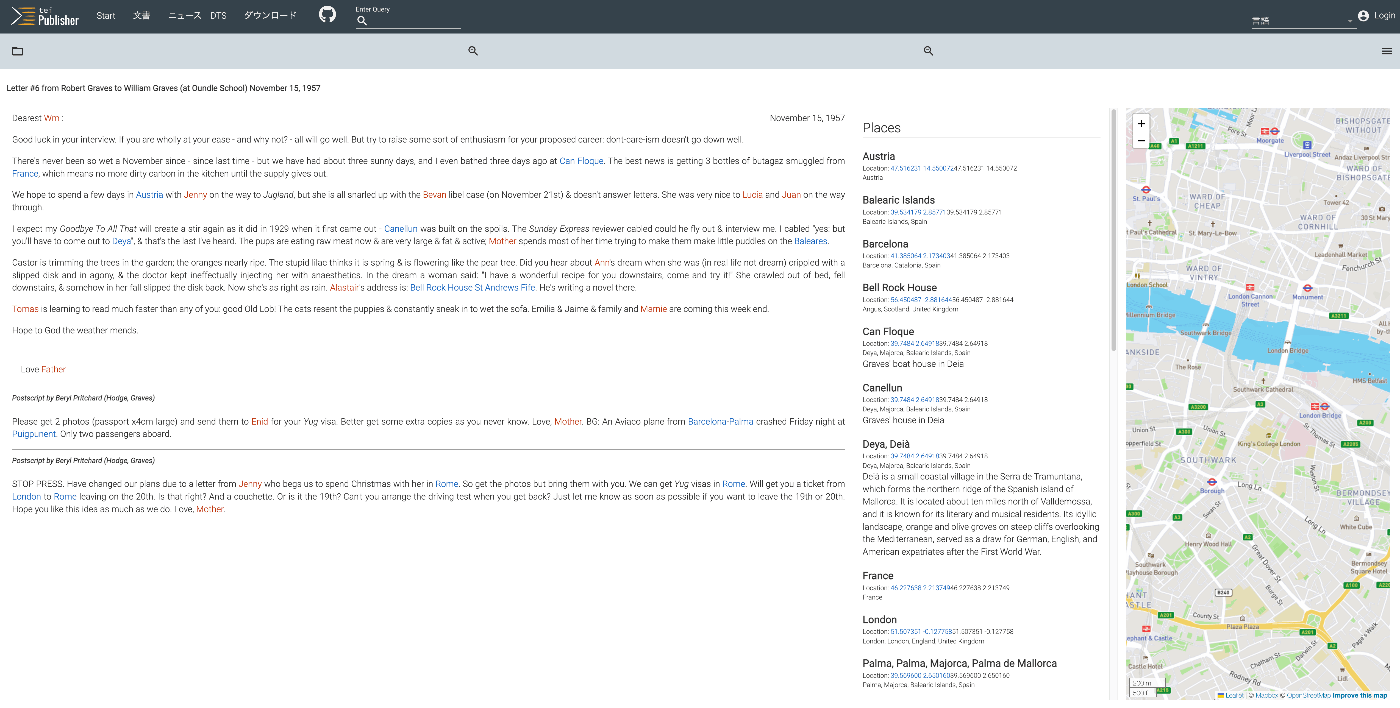
Overview The following page on TEI Publisher showcases various visualization examples. https://teipublisher.com/exist/apps/tei-publisher/index.html?query=&collection=test&sort=title&field=text&start=1 In this and subsequent articles, I will introduce the above visualization examples. Letter #6 from Robert Graves to William Graves (at Oundle School) November 15, 1957 Overview https://teipublisher.com/exist/apps/tei-publisher/test/graves6.xml As shown below, the text is displayed alongside a list of place names and person names, as well as a map. It is described as follows: A 20th century manuscript letter from Robert Graves where emphasis has been put on visualizing rich encoding of semantic information in the letter, in particular geographic and prosopographical data. The map is displayed with a pb-leaflet component. ...

November 12, 2023 · 6 min · Nakamura

Vue.js: Handling Panes with iframes When Using Splitpanes

Splitpanes is a Vue.js library that enables pane splitting and resizing, as shown below. https://github.com/antoniandre/splitpanes When using this library, I encountered an issue where resizing did not work properly when a pane contained an iframe element. A solution was described in the following pull request. https://github.com/antoniandre/splitpanes/pull/162 As described there, adding the following CSS resolved the issue and allowed correct resize operations even with panes containing iframe elements. .splitpanes--dragging .splitpanes__pane { pointer-events: none; } I hope this helps anyone experiencing the same issue. ...

November 6, 2023 · 1 min · Nakamura

Formatting and Syntax Highlighting XML in Nuxt3

Overview As shown in the following image, I had the opportunity to display XML text data using Nuxt3, so this is a memo. Installation I used the following two libraries. npm i xml-formatter npm i highlight.js Usage I created the following file as a Nuxt3 component. It formats XML strings with xml-formatter and then applies syntax highlighting with highlight.js. <script setup lang="ts"> import hljs from "highlight.js"; import "highlight.js/styles/xcode.css"; import formatter from "xml-formatter"; interface PropType { xml: string; } const props = withDefaults(defineProps<PropType>(), { xml: "", }); const formattedXML = ref<string>(""); onMounted(() => { // `highlightAuto` 関数が非同期でない場合は、 // `formattedXML` を直接アップデートできます。 // そうでない場合は、適切な非同期処理を行ってください。 formattedXML.value = hljs.highlightAuto(formatXML(props.xml)).value; }); const formatXML = (xmlstring: string) => { return formatter(xmlstring, { indentation: " ", filter: (node) => node.type !== "Comment", }); }; </script> <template> <pre class="pa-4" v-html="formattedXML"></pre> </template> <style> pre { /* 以下のスタイルは適切で、pre要素内のテキストの折り返しを制御しています。 */ white-space: pre-wrap; /* CSS 3 */ white-space: -moz-pre-wrap; /* Mozilla, 1999年から2002年までに対応 */ white-space: -pre-wrap; /* Opera 4-6 */ white-space: -o-pre-wrap; /* Opera 7 */ word-wrap: break-word; /* Internet Explorer 5.5+ */ } </style> Summary I hope this is helpful for visualizing TEI/XML data. ...

November 6, 2023 · 1 min · Nakamura

Schemas Convertible from TEI ODD: RNG, XSD, DTD, and More

Overview In the following article, I tried creating an ODD. The above uses a tool called Roma, and you can see that the created ODD has the following output formats available. Specifically, the available formats are “RELAX NG Schema,” “RELAX NG Compact,” “W3C Schema,” “Document Type Definition,” and “ISO Schematron Constraints.” I asked GPT-4 about the differences between these formats and am sharing the results here. There may be some inaccuracies, but I hope this serves as a useful reference. ...

November 4, 2023 · 5 min · Nakamura

Using Roma to Limit Tags for Your Project and Generate Documentation

Overview I previously explained how to use Roma in the following article. This time, I will explain the workflow for creating TEI ODD (One Document Does-it-all) and documentation (HTML and PDF) targeting TEI/XML files at hand. Note that at the end of this article, I have included GPT-4’s response regarding the differences between ODD (One Document Does it all) and RNG (RelaxNG). Please refer to that as well. Obtaining a List of Tags Used First, obtain a list of tags used in your project. ...

November 3, 2023 · 5 min · Nakamura

Using Versioning Machine (VM5.0) with Visual Studio Code (VSCode)

Overview Versioning Machine (VM5.0) is an application for visualizing textual variant information. http://v-machine.org/ This article explains how to use Visual Studio Code (VSCode) to display your own TEI/XML files in this application. The target TEI/XML files contain variant information described using the <listWit> tag, as shown below: <TEI xmlns="http://www.tei-c.org/ns/1.0"> <teiHeader> <fileDesc> <titleStmt> ... </titleStmt> <publicationStmt> ... </publicationStmt> <sourceDesc> <listWit> <witness xml:id="WA"> <title xml:lang="ja">ヴァイマル版ゲーテ全集(略称WA)</title> <title xml:lang="de">Goethes Werke. herausgegeben im Auftrage der Großherzogin Sophie von Sachsen</title> </witness> <witness xml:id="UTL"> <title xml:lang="ja">東京大学総合図書館所蔵のゲーテ自署付書簡</title> <title xml:lang="de">Der Brief von Goethe an Ludwig Wilhelm Cramer vom 29. Dezember 1822 im Besitz der Universitätsbibliothek Tokio</title> </witness> </listWit> <msDesc sameAs="#UTL"> ... As described later, this article uses text data from a letter with Goethe’s autograph held in the University of Tokyo General Library, which is publicly available at the following link: ...

November 3, 2023 · 3 min · Nakamura

Created a Python Library to Convert Freehand Annotations to Rectangles

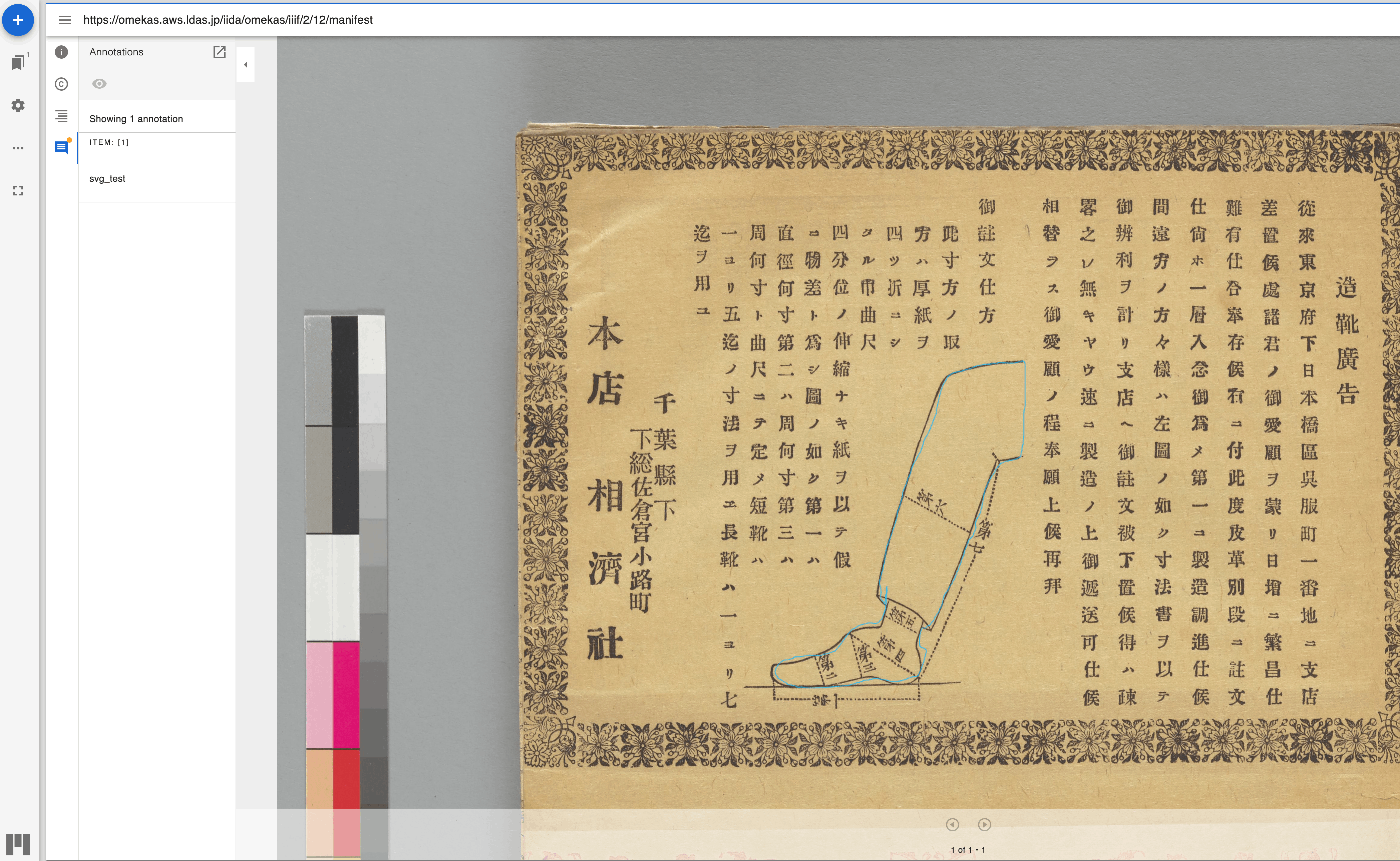
Created a Python Library to Convert Freehand Annotations to Rectangles Taking freehand annotations created as shown below as input, they are converted to rectangular annotations as follows. The “Tanaka Yoshio Hakubutsugaku Collection” (held by the University of Tokyo General Library) is used. For specific usage instructions, please refer to the following notebook. https://github.com/nakamura196/000_tools/blob/main/フリーハンドのアノテーションを矩形にconversionする.ipynb I hope this serves as a useful reference for utilizing IIIF annotations.

November 2, 2023 · 1 min · Nakamura

Making Field Values Selectable in Drupal

Purpose This article explains how to make field value input selectable, as shown below. Below, I’ll explain both the text case and the entity reference case. Text Case Create a field called age. Here, select “List (text)”. Enter the choices as follows. As a result, the field can be edited in a “Select list” format as shown below. Furthermore, from the content type list page, click “Manage form display”. ...

October 31, 2023 · 2 min · Nakamura

Enabling Search by ID and Title When Referencing Other Content in Drupal

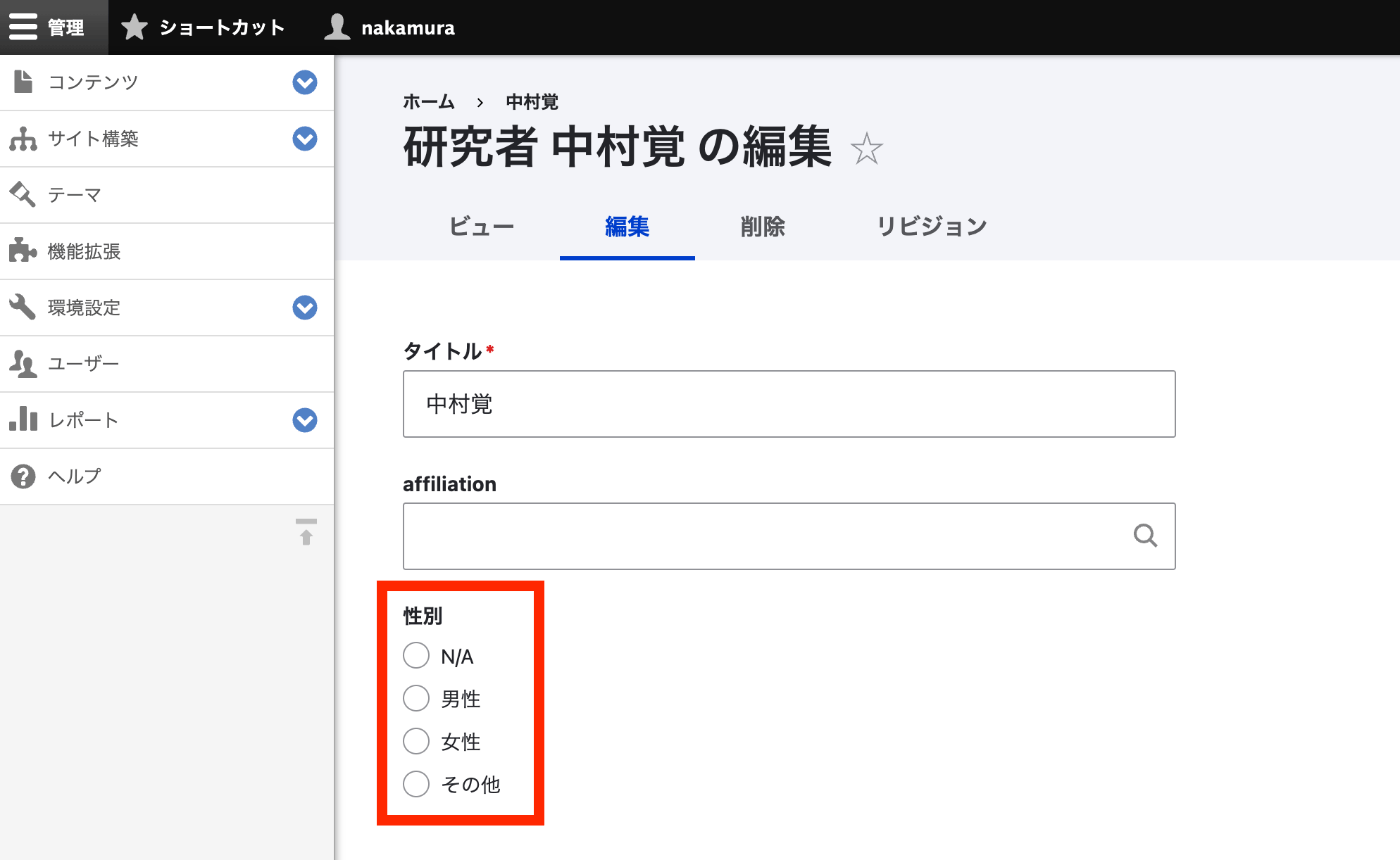
Introduction For example, suppose you create a content type called “Organization” in Drupal and create content items for “The University of Tokyo” and “Kyoto University.” At this point, assume that IDs from the Research Organization Registry (ROR) are also registered as follows. Title ID The University of Tokyo 057zh3y96 Kyoto University 02kpeqv85 Now, let’s try referencing this content from another content type (for example, a “Researcher” content type) using an affiliation field. When you type something like “University,” the two registered content items are displayed as shown below. ...

October 31, 2023 · 3 min · Nakamura

Drupal: Handling Errors When Updating the `uid` Field via API

When attempting to update a node’s uid field using Drupal’s JSONAPI, the following error occurred: The current user is not allowed to PATCH the selected field (uid). The 'administer nodes' permission is required. This was resolved by changing the permissions. Specifically, the issue was resolved by enabling the Administer content checkbox under Node. However, please note the following warning that was displayed: Warning: Give to trusted roles only; this permission has security implications. Promote, change ownership, edit revisions, and perform other tasks across all content types. ...

October 26, 2023 · 1 min · Nakamura

Handling "Some resources have been omitted because of insufficient autho..." in Drupal

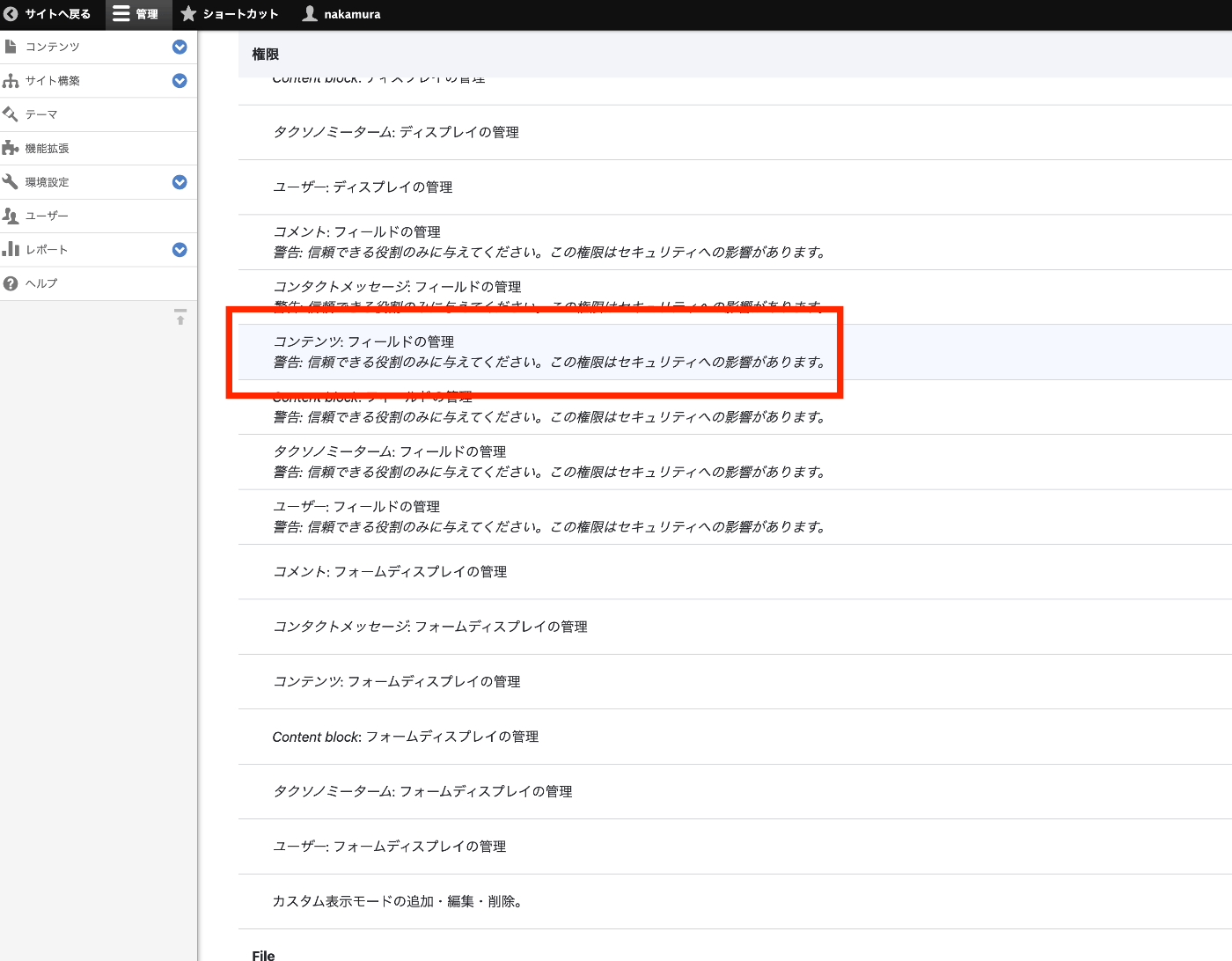
When using Drupal’s JSON API, I tried to retrieve field_name from a field ID using a query like the following, but got zero results. https://xxx/jsonapi/field_config/field_config?fields[field_config–field_config]=label%2Cfield_name&filter[name-filter][condition][path]=field_name&filter[name-filter][condition][operator]=IN&filter[name-filter][condition][value][1]=field_xxx1&filter[name-filter][condition][value][2]=field_xxx2&filter[name-filter][condition][value][3]=field_xxx3&filter[bundle]=yyy The meta field in the returned result indicated a permissions issue. { "jsonapi": { "version": "1.0", "meta": { "links": { "self": { "href": "http://jsonapi.org/format/1.0/" } } } }, "data": [], "meta": { "omitted": { "detail": "Some resources have been omitted because of insufficient authorization.", ... } }, ... } By changing the permissions for Content: Administer fields under Field UI as shown in the figure below, the permissions issue was resolved. ...

October 26, 2023 · 1 min · Nakamura

Converting JSON-LD Data to RDF/XML and Turtle Using EASY RDF

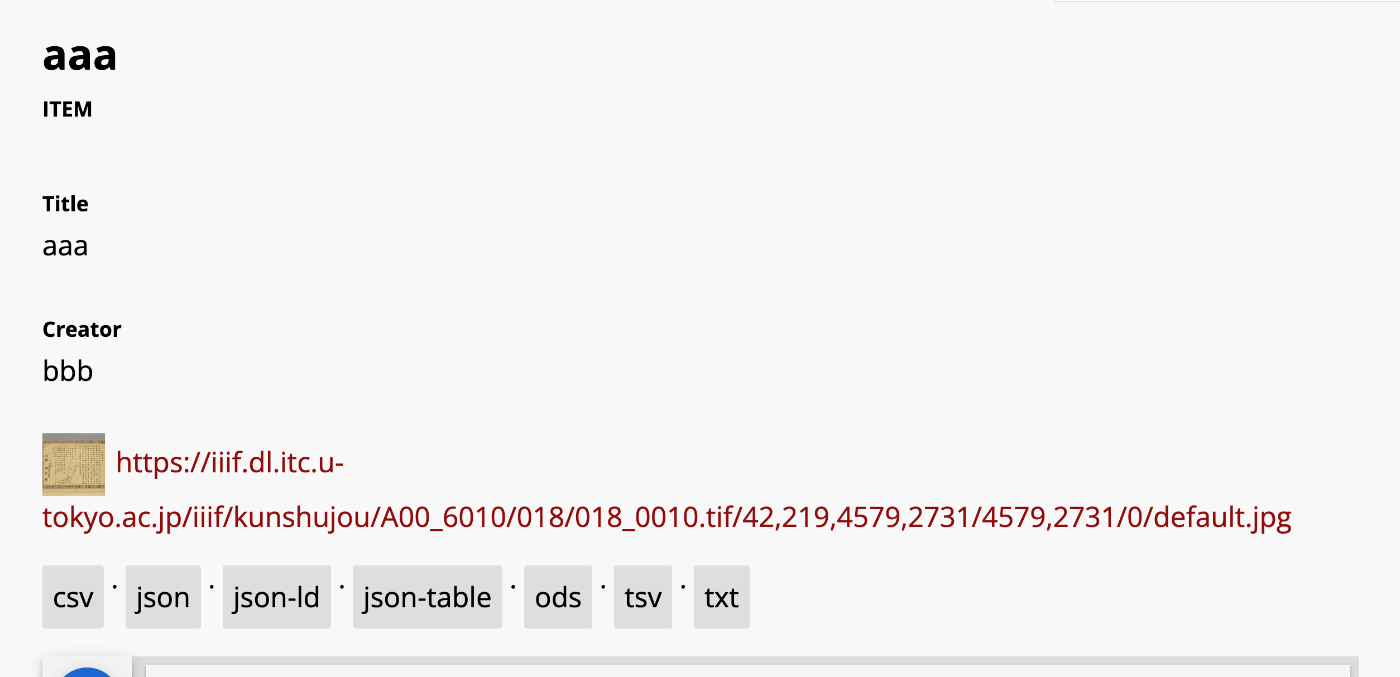
Overview In the following article, I introduced how to add an export feature. One of the export formats available is JSON-LD. In this article, we will try converting this JSON-LD to RDF/XML and Turtle formats. Tool Used This time, we will use EASY RDF. https://www.easyrdf.org/converter Copy the contents of the following JSON-LD obtained through the Omeka S export. { "@context": "https://omekas.aws.ldas.jp/xxx/omekas/api-context", "@id": "https://omekas.aws.ldas.jp/xxx/omekas/api/items/12", "@type": "o:Item", "o:id": 12, "o:is_public": true, "o:owner": { "@id": "https://omekas.aws.ldas.jp/xxx/omekas/api/users/1", "o:id": 1 }, "o:resource_class": null, "o:resource_template": null, "o:thumbnail": null, "o:title": "aaa", "thumbnail_display_urls": { "large": "https://omekas.aws.ldas.jp/xxx/omekas/files/large/4f57960c4471c954c6d3aac0a23bd441a6f4eb8b.jpg", "medium": "https://omekas.aws.ldas.jp/xxx/omekas/files/medium/4f57960c4471c954c6d3aac0a23bd441a6f4eb8b.jpg", "square": "https://omekas.aws.ldas.jp/xxx/omekas/files/square/4f57960c4471c954c6d3aac0a23bd441a6f4eb8b.jpg" }, "o:created": { "@value": "2023-07-26T22:52:31+00:00", "@type": "http://www.w3.org/2001/XMLSchema#dateTime" }, "o:modified": { "@value": "2023-10-17T06:56:16+00:00", "@type": "http://www.w3.org/2001/XMLSchema#dateTime" }, "o:media": [ { "@id": "https://omekas.aws.ldas.jp/xxx/omekas/api/media/13", "o:id": 13 } ], "o:item_set": [], "o:site": [ { "@id": "https://omekas.aws.ldas.jp/xxx/omekas/api/sites/1", "o:id": 1 } ], "dcterms:title": [ { "type": "literal", "property_id": 1, "property_label": "Title", "is_public": true, "@value": "aaa" } ], "dcterms:creator": [ { "type": "literal", "property_id": 2, "property_label": "Creator", "is_public": true, "@value": "bbb" } ] } Then, paste it into the Input Data form in EASY RDF. ...

October 24, 2023 · 2 min · Nakamura

[Omeka S Module Introduction] BulkExport: Adding Export Functionality to Item Detail Pages

Overview In the following article, I introduced how to bulk export data using the BulkExport module. This module also provides functionality to display an export button on item detail pages. I will introduce how to use this feature. Usage The installation method is the same as for general modules. It is also briefly explained in the article above. After activating the module, export links in various formats are displayed on item detail pages as shown below. ...

October 17, 2023 · 2 min · Nakamura

Disabling Autotune in Amazon OpenSearch Service

When attempting to change the instance type from t3.small.search to t3.medium.search on a development domain in Amazon OpenSearch Service, the following message was displayed. Autotune is not supported in t2/t3 instance types. Disable autotune or change your instance type. I could not find the Autotune setting in the UI, but the following page described how to do it using the CLI. https://docs.aws.amazon.com/opensearch-service/latest/developerguide/auto-tune.html#auto-tune-enable So I ran the following command. aws opensearch update-domain-config \ --domain-name my-domain \ --auto-tune-options DesiredState=DISABLED After that, I was able to successfully change the instance type. ...

October 3, 2023 · 1 min · Nakamura

Installing drush on Drupal Built with Lando

I set up a Drupal development environment using Lando, referring to the following site. https://www.acquia.com/jp/blog/how-to-use-lando-for-building-drupal-local-environment For installing drush on it, the following was helpful. https://docs.lando.dev/drupal/getting-started.html#quick-start By running the following command, drush became available. # Install a site local drush lando composer require drush/drush I hope this serves as a useful reference for others.

September 28, 2023 · 1 min · Nakamura

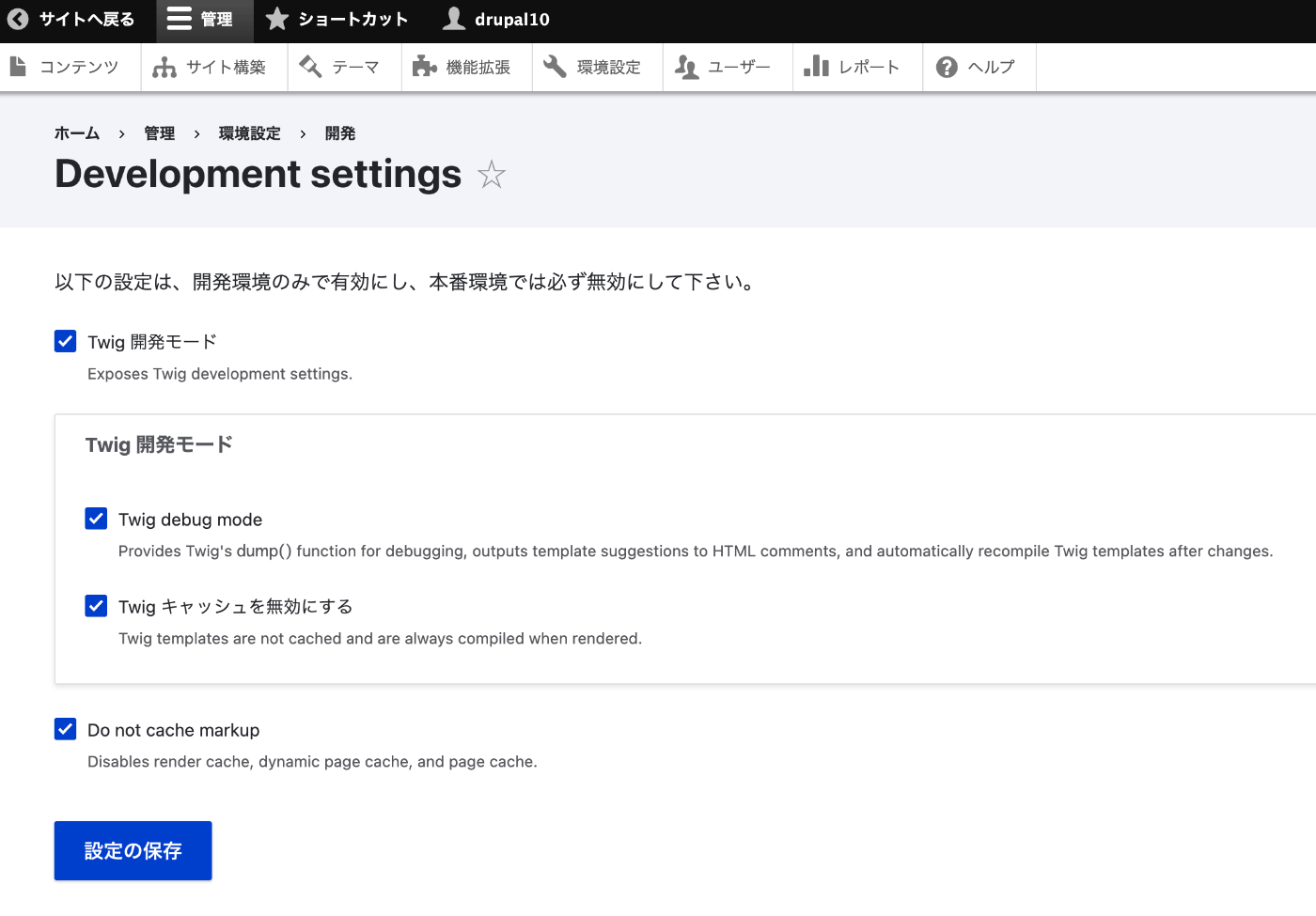
How to Disable Twig Cache in Drupal 10.1.0 and Later

The instructions were found at the following page. https://www.drupal.org/docs/develop/development-tools/disable-caching#s-disabling-twig-caching-the-easy-way Access the following path: /admin/config/development/settings Checking the boxes on the following screen disables the cache. I hope this is helpful for others.

September 28, 2023 · 1 min · Nakamura

Enabling HTTPS for Archivematica on EC2

Introduction In the following article, I described how to set up Archivematica on EC2. This time, we configure a custom domain and enable HTTPS. Custom Domain Configuration This time, we assign the domains matica.aws.ldas.jp and storage.aws.ldas.jp to the IP address. We use Route 53. Obtaining an SSL Certificate sudo su yum install epel-release yum install certbot ertbot certonly --webroot -w /usr/share/nginx/html -d matica.aws.ldas.jp -d storage.aws.ldas.jp Web Server Configuration: Nginx Installation vi /etc/nginx/conf.d/archivematica-and-storage.conf Configuration: ...

September 22, 2023 · 1 min · Nakamura