[RDF] Configuring URI Access to Redirect to the Snorql Interface

This is a continuation of the following article. This is a memo on configuring redirects so that accessing URLs like https://xxx.abc/data/123 redirects to https://xxx.abc/?describe=https://xxx.abc/data/123, using Japan Search’s RDF store as a reference. Japan Search example: https://jpsearch.go.jp/entity/chname/葛飾北斎 -> https://jpsearch.go.jp/rdf/sparql/easy/?describe=https://jpsearch.go.jp/entity/chname/葛飾北斎 Create a conf file like the following and place it in the appropriate location (e.g., /etc/httpd/conf.d/). RewriteEngine on RewriteCond %{HTTP_ACCEPT} .*text/html RewriteRule ^/((data|entity)/.*) https://xxx.abc/?describe=https://xxx.abc/$1 [L,R=303] Then restart Apache. systemctl restart httpd This enables redirecting to the Snorql interface. ...
August 19, 2022 · Updated: August 19, 2022 · 1 min · Nakamura

Returning JSON from Hugging Face Spaces

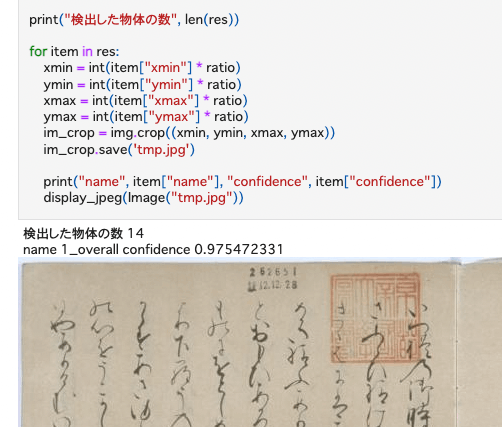
Previously, I built an inference app using Hugging Face Spaces and a YOLOv5 model (trained on the NDL-DocL dataset): This time, I modified the app above to add JSON output, as shown in the following diff: https://huggingface.co/spaces/nakamura196/yolov5-ndl-layout/commit/4d48b95ce080edd28d68fba2b5b33cc17b9b9ecb#d2h-120906 This enables processing using the returned results, as shown in the following notebook: https://github.com/nakamura196/ndl_ocr/blob/main/GradioのAPIを用いた物体検出例.ipynb There may be better approaches, but I hope this serves as a useful reference.

August 16, 2022 · Updated: August 16, 2022 · 1 min · Nakamura

Building a Virtuoso RDF Store Using AWS EC2

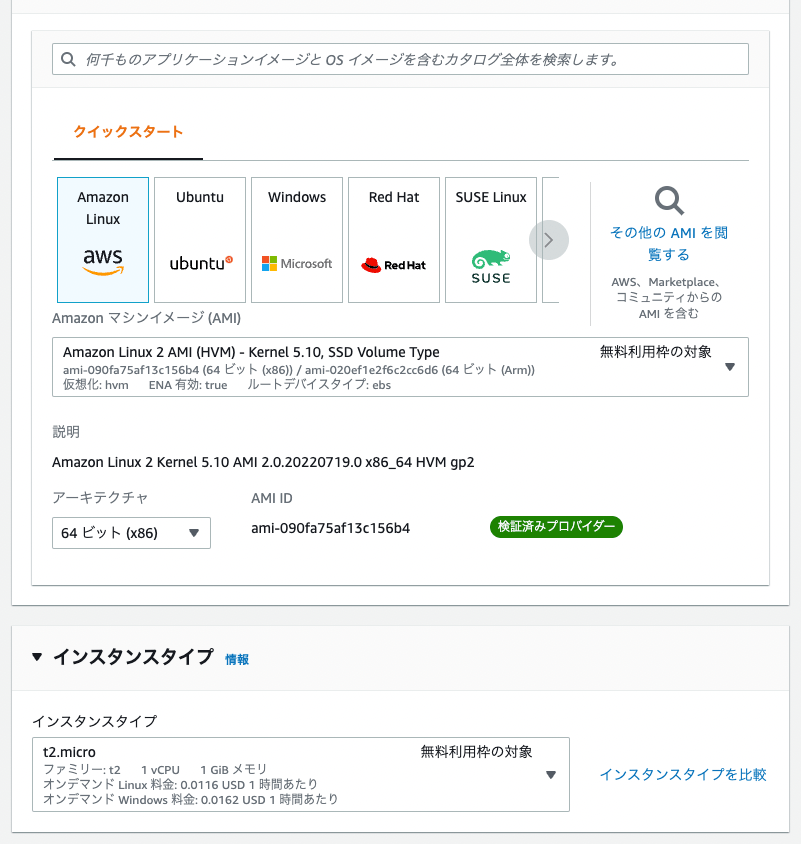
Introduction These are notes on building a Virtuoso RDF store using AWS EC2. This covers custom domain configuration, HTTPS connection, and Snorql installation. There are many other useful articles on building Virtuoso. Please refer to them as well: https://midoriit.com/2014/04/rdfストア環境構築virtuoso編1.html https://qiita.com/mirkohm/items/30991fec120541888acd https://zenn.dev/ningensei848/articles/virtuoso_on_gcp_faster_with_cos Prerequisites An ACM Certificate should already be created. Please refer to articles such as the following: https://dev.classmethod.jp/articles/specification-elb-setting/#toc-3 EC2 First, create an EC2 instance. Select Amazon Linux, and set the instance type to t2.micro. ...

August 16, 2022 · Updated: August 16, 2022 · 4 min · Nakamura

How to Register and Delete RDF Files in Virtuoso RDF Store Using curl and Python

Overview Notes on how to register and delete RDF files in Virtuoso RDF store using curl and Python. The following was used as a reference. https://vos.openlinksw.com/owiki/wiki/VOS/VirtRDFInsert#HTTP PUT curl As described on the above page. First, create myfoaf.rdf as sample data for registration. <rdf:RDF xmlns:foaf="http://xmlns.com/foaf/0.1/"> <foaf:Person rdf:about="http://www.example.com/people/中村覚"> <foaf:name>中村覚</foaf:name> </foaf:Person> </rdf:RDF> Next, execute the following command. curl -T ${filename1} ${endpoint}/DAV/home/${user}/rdf_sink/${filename2} -u ${user}:${passwd} A specific example is as follows. curl -T myfoaf.rdf http://localhost:8890/DAV/home/dba/rdf_sink/myfoaf.rdf -u dba:dba Python Here is an execution example. The following uses rdflib to create the RDF file from scratch. Also, by setting the action to delete, you can perform deletion. ...

August 16, 2022 · Updated: August 16, 2022 · 1 min · Nakamura

Building an Inference App Using Hugging Face Spaces and a YOLOv5 Model (Trained on the NDL-DocL Dataset)

Overview I created an inference app using Hugging Face Spaces and the YOLOv5 model (trained on the NDL-DocL dataset) introduced in the following article. You can try it at the following URL. https://huggingface.co/spaces/nakamura196/yolov5-ndl-layout You can also download the source code and trained model from the following URL. We hope this serves as a reference when developing similar applications. https://huggingface.co/spaces/nakamura196/yolov5-ndl-layout The application development referenced the following Space. https://huggingface.co/spaces/pytorch/YOLOv5 Usage You can upload an image or select one from the Examples. The recognition results can be viewed as shown below. ...

August 4, 2022 · Updated: August 4, 2022 · 1 min · Nakamura

Dumping Elasticsearch Data to Local

To dump data from Elasticsearch to local, I used elasticsearch-dump. Here are my notes. https://github.com/elasticsearch-dump/elasticsearch-dump By using the v option as shown below, files created in the container persist on the host side. The limit option and others are optional. docker run -v [absolute path of host directory]:[absolute path in container] --rm -ti elasticdump/elasticsearch-dump --input [source Elasticsearch index endpoint] --output=[absolute path in container]/[output file name].json --limit 10000 Specifically, it looks like the following. ...

July 27, 2022 · Updated: July 27, 2022 · 1 min · Nakamura

Building a Layout Extraction Model Using the NDL-DocL Dataset and YOLOv5

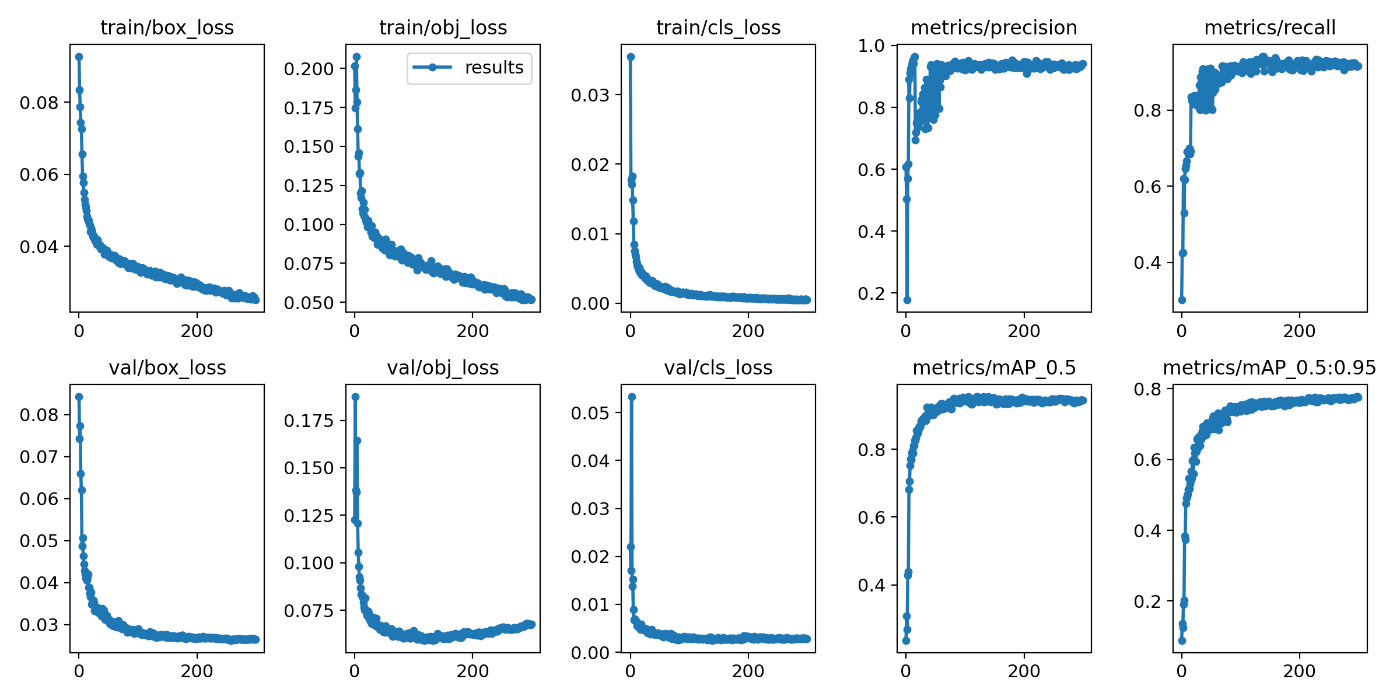
Overview I built a layout extraction model using the NDL-DocL dataset and YOLOv5. https://github.com/ndl-lab/layout-dataset https://github.com/ultralytics/yolov5 You can try this model using the following notebook. https://colab.research.google.com/github/nakamura196/ndl_ocr/blob/main/NDL_DocLデータセットとYOLOv5を用いたレイアウト抽出モデル.ipynb This article is a record of the training process above. Creating the Dataset The NDL-DocL dataset in Pascal VOC format is converted to YOLO format. For this method, refer to the following article. In addition to the conversion from Pascal VOC format to COCO format, conversion from COCO format to YOLO format was added. ...

July 25, 2022 · Updated: July 25, 2022 · 1 min · Nakamura

Getting a Google Drive Folder ID from a Path Using Google Colab

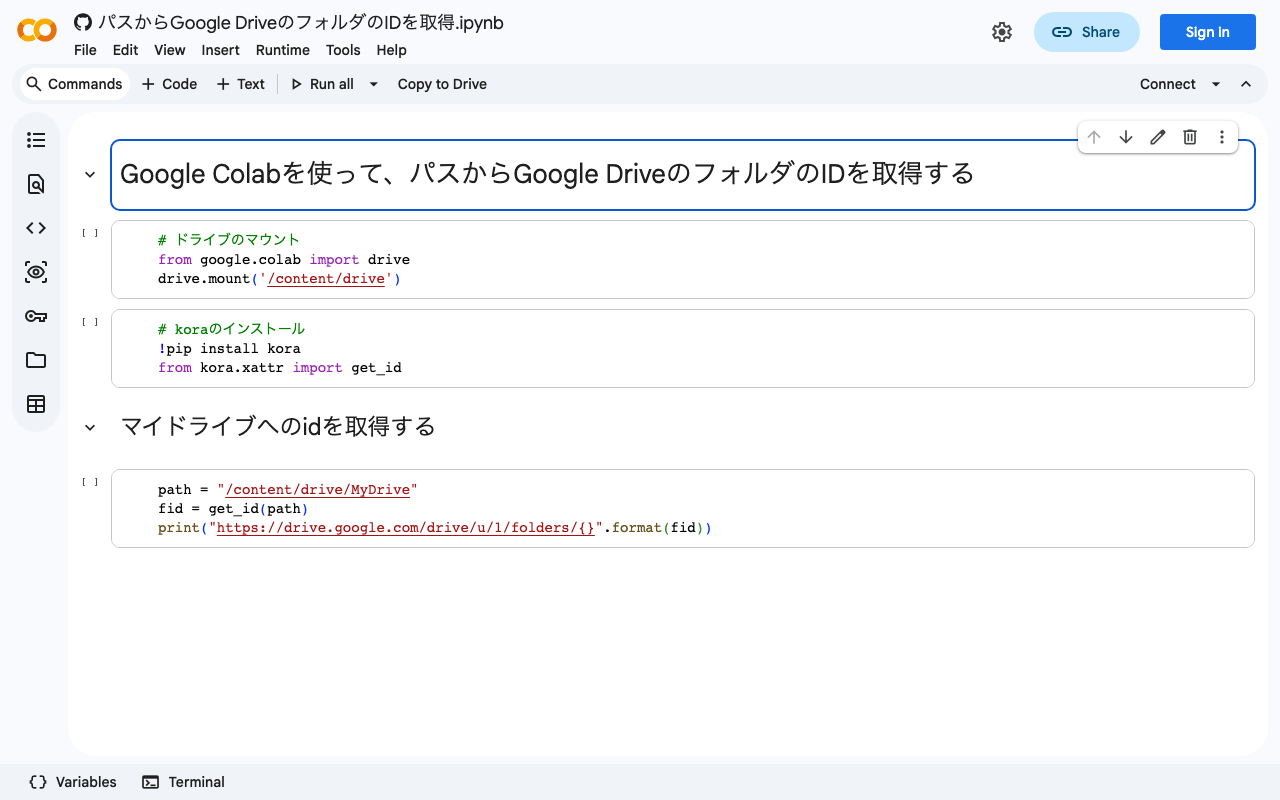
This is based on the following page. https://stackoverflow.com/questions/67324695/is-there-a-way-to-get-the-id-of-a-google-drive-folder-from-the-path-using-colab By writing the following code, you can get a Google Drive folder ID from a path. # ドライブのマウント from google.colab import drive drive.mount('/content/drive') # koraのインストール !pip install kora from kora.xattr import get_id # 例)マイドライブへのidを取得する path = "/content/drive/MyDrive" fid = get_id(path) print("https://drive.google.com/drive/u/1/folders/{}".format(fid)) You can also try it from the following notebook. I hope you find this helpful. https://colab.research.google.com/github/nakamura196/ndl_ocr/blob/main/パスからGoogle_DriveのフォルダのIDを取得.ipynb

July 25, 2022 · Updated: July 25, 2022 · 1 min · Nakamura

Hosting Hugging Face Models on AWS Lambda for Serverless Inference

Overview This is a personal note on hosting Hugging Face models on AWS Lambda for serverless inference, based on the following article. https://aws.amazon.com/jp/blogs/compute/hosting-hugging-face-models-on-aws-lambda/ Additionally, I cover providing an API using Lambda function URLs and CloudFront. Hosting Hugging Face Models on AWS Lambda Preparation For this section, I referred to the document introduced at the beginning. https://aws.amazon.com/jp/blogs/compute/hosting-hugging-face-models-on-aws-lambda/ First, run the following commands. I created a virtual environment called venv, but this is not strictly required. ...

July 17, 2022 · Updated: July 17, 2022 · 3 min · Nakamura

Building an Omeka Classic Site Using Amazon Lightsail (Including Custom Domain + SSL)

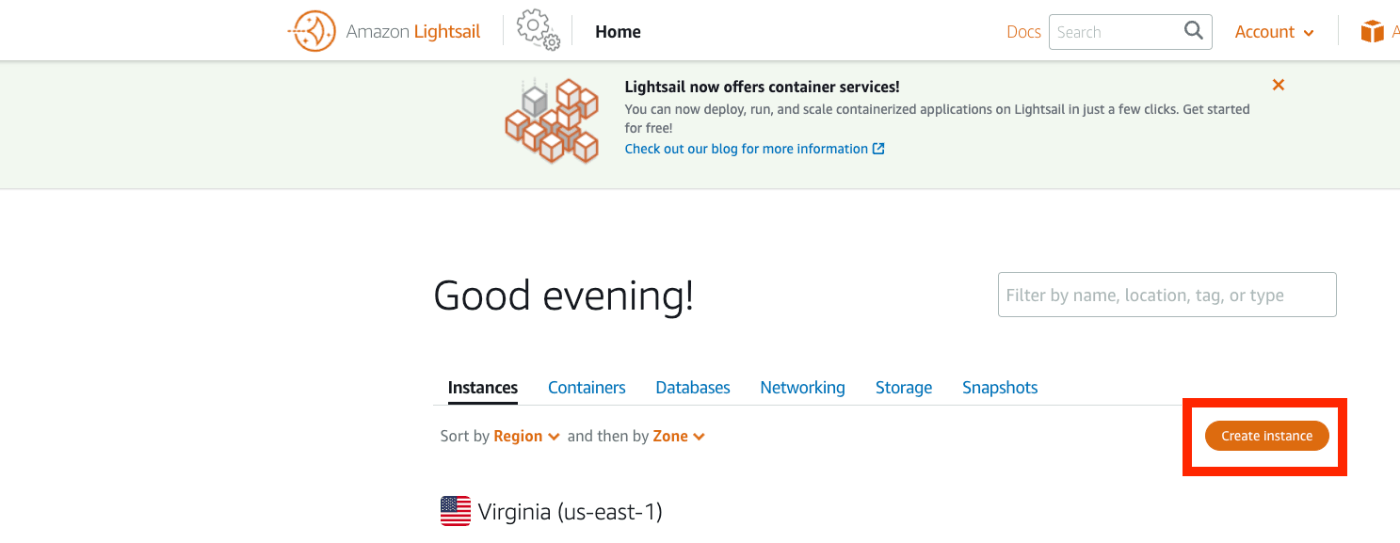
Overview I summarized how to build Omeka S using Amazon Lightsail in the following article. This time, I will introduce how to build Omeka Classic using Amazon Lightsail. As described in the following book, Omeka Classic is useful for building annotation environments using the IIIF Toolkit. https://zenn.dev/nakamura196/books/2a0aa162dcd0eb Amazon Lightsail Creating an Instance Access the following page. https://lightsail.aws.amazon.com/ls/webapp/home/instances Then click the “Create Instance” button. Under “Select a blueprint,” choose “LAMP (PHP 7).” ...

July 7, 2022 · Updated: July 7, 2022 · 3 min · Nakamura

Aggregations with Different Keys and Values (Labels and IDs) in Elasticsearch

Overview I am currently working on updating the search application for the Cultural Japan project, and I needed to perform aggregation on multilingual data. This article is a memo of the investigation results regarding the methods. Data For the data, we assume a case where the agential (indicating a person) field has values for id, ja, and en. { "agential": [ { "ja": "葛飾北斎", "en": "Katsushika, Hokusai", "id": "chname:葛飾北斎" } ] } For the above data, we want to perform filtering by id while displaying the ja or en value according to the language setting. ...

July 4, 2022 · Updated: July 4, 2022 · 6 min · Nakamura

Created a Video on How to Use the NDLOCR App with Google Colab

I created a video on how to use the NDLOCR app with Google Colab. I hope it serves as a useful reference. https://youtu.be/46p7ZZSul0o The blog used in the video is the following. Note that the “Initial Setup” portion has been trimmed in the video. In reality, it takes about 3-5 minutes, so please be aware.

June 30, 2022 · Updated: June 30, 2022 · 1 min · Nakamura

Scheduled Backup of Omeka S Data Using AWS Copilot

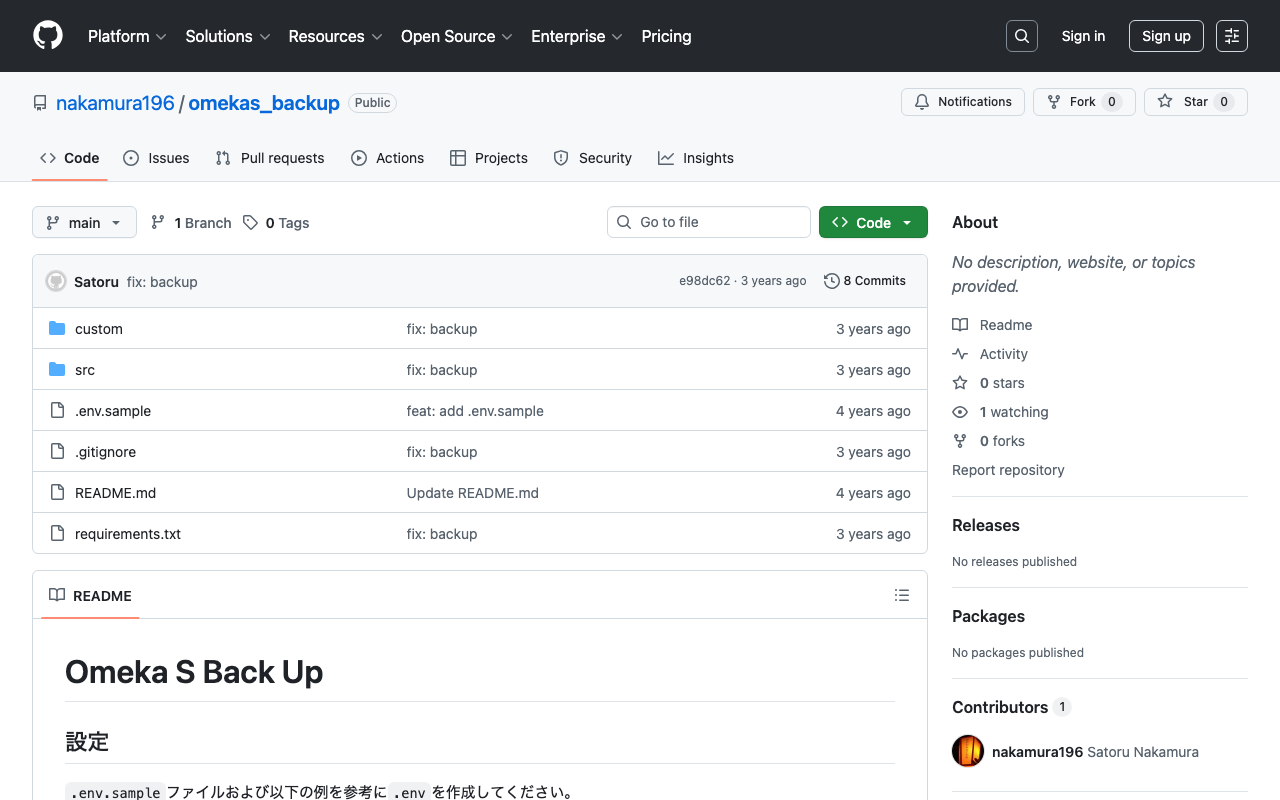
Overview I previously created a program to download Omeka S data. This time, I use AWS Copilot to run the above program on a scheduled basis. Installing AWS Copilot Please refer to the following. https://docs.aws.amazon.com/ja_jp/AmazonECS/latest/developerguide/AWS_Copilot.html Preparing Files Create three files in any location: Dockerfile, main.sh, and .env. Dockerfile FROM python:3 COPY *.sh . CMD sh main.sh main.sh set -e export output_dir=../docs # Program to download data from Omeka S export repo_tool=https://github.com/nakamura196/omekas_backup.git dir_tool=tool dir_dataset=dataset # If folder exists if [ -d $dir_tool ]; then rm -rf $dir_tool rm -rf $dir_dataset fi # clone git clone --depth 1 $repo_tool $dir_tool git clone --depth 1 $repo_dataset $dir_dataset # requirements.txt cd $dir_tool pip install --upgrade pip pip install -r requirements.txt # Execute cd src sh main.sh # copy odir=../../$dir_dataset/$subdir mkdir -p $odir cd $odir cp -r ../../$dir_tool/data . cp -r ../../$dir_tool/docs . # git git status git add . git config user.email "$email" git config user.name "$name" git commit -m "update" git push # Cleanup cd ../../ rm -rf $dir_tool rm -rf $dir_dataset .env api_url=https://dev.omeka.org/omeka-s-sandbox/api github_url=https://<personal-access-token>@github.com/<username>/<repository-name>.git username=nakamura email=nakamura@example.org dirname=dev The following is an explanation of the parameters. ...

June 24, 2022 · Updated: June 24, 2022 · 3 min · Nakamura

How to Add the mirador-image-tools Plugin to Mirador 3 and Bundle It into a Single JS File for Distribution

Overview As the title suggests, this article describes how to add plugins such as mirador-image-tools to Mirador 3 and bundle them into a single JS file for distribution. Due to my limited knowledge of JavaScript, there may be some inaccuracies. I would appreciate it if you could point out any mistakes. Goal The goal is to create an application like the one at the following URL by writing an HTML file as shown below. It uses Mirador 3 with the mirador-image-tools plugin enabled. ...

June 8, 2022 · Updated: June 8, 2022 · 2 min · Nakamura

File Upload (Python) and Download (PHP)

I had an opportunity to upload files to a server, so this is a memo of the process. The image receiving program running on the server was created in PHP. Please be careful about security. upload.php <?php $root = "./"; // Change as appropriate. $path = $_POST["path"]; $dirname = dirname($path); if (!file_exists($dirname)) { mkdir($dirname, 0755, true); } move_uploaded_file($_FILES['media']['tmp_name'], $root.$path); ?> The program to upload files via POST was created in Python. It posts the local image file and the output destination path. ...

June 3, 2022 · Updated: June 3, 2022 · 1 min · Nakamura

Creating Microsoft Word Files with python-docx: Using Templates and int2kanji

Overview I had the opportunity to convert information managed in a tabular format into a vertical-writing Microsoft Word format, so here are my notes. Before conversion: Research Project Title Project Number Direct Costs Development of Digital Archive System Construction Methods Considering Sustainability and Reusability 21K18014 2600000 After conversion: The implementation uses a specified template and the “Kanjize” library for mutual conversion between numbers and kanji numerals. Creating Microsoft Word Files with python-docx First, create a Microsoft Word template file like the following. While using the specified layout, place {<variable_name>} in the parts where values should be changed. ...

May 31, 2022 · Updated: May 31, 2022 · 2 min · Nakamura

Sample Notebook for Fetching Google Spreadsheet Data from Google Colab

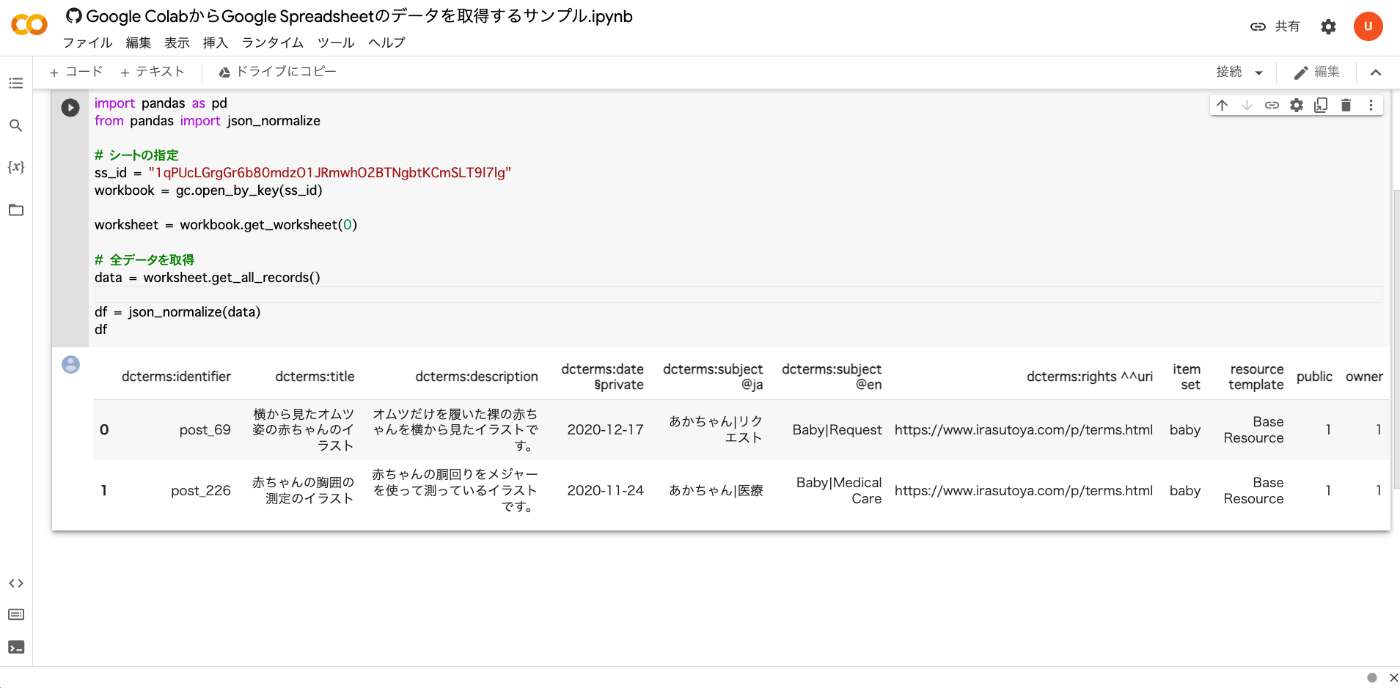
I created a sample notebook for fetching Google Spreadsheet data from Google Colab. You can try it from the following link. https://colab.research.google.com/github/nakamura196/ndl_ocr/blob/main/Google_ColabからGoogle_Spreadsheetのデータを取得するサンプル.ipynb As shown below, you can retrieve the contents of a Google Spreadsheet. Below is the source code. from google.colab import auth auth.authenticate_user() import gspread from google.auth import default creds, _ = default() gc = gspread.authorize(creds) import pandas as pd from pandas import json_normalize # Specify the sheet ss_id = "<Google Spreadsheet ID>" workbook = gc.open_by_key(ss_id) worksheet = workbook.get_worksheet(0) # Fetch all data data = worksheet.get_all_records() df = json_normalize(data) df I hope this serves as a useful reference. ...

May 25, 2022 · Updated: May 25, 2022 · 1 min · Nakamura

Memo: Specifying a Profile When Running sam deploy

Specify a profile when deploying as follows. sam deploy --guided --profile <profile-name>

May 21, 2022 · Updated: May 21, 2022 · 1 min · Nakamura

Resolving "Error building docker image" During Local Development with AWS SAM

When doing local development with AWS SAM, I follow these steps: sam init --runtime=python3.8 cd sam-app sam local start-api However, when running the above, the following error sometimes occurred: samcli.commands.local.cli_common.user_exceptions.ImageBuildException: Error building docker image: pull access denied for public.ecr.aws/sam/emulation-python3.8, repository does not exist or may require 'docker login': denied: Your authorization token has expired. Reauthenticate and try again. Running the following command resolved the error. The region may need to be adjusted for your environment: ...

May 21, 2022 · Updated: May 21, 2022 · 1 min · Nakamura

Simple Backup of Omeka S Using gdrive

Overview This is a memo on how to perform simple backups of Omeka S using gdrive. As an example, we target Omeka S installed on a LAMP environment launched on Amazon Lightsail. Please refer to the following for installation instructions. Installing gdrive This time, we will back up files to Google Drive. For this purpose, we use gdrive. Please install gdrive by referring to the following article. Prepare a Backup Script In the $HOME directory, create a file such as backup.sh. An example of the file contents is as follows. ...

May 12, 2022 · Updated: May 12, 2022 · 2 min · Nakamura