How to Upload and Update Files Using the GitHub GUI

Overview I had the opportunity to share how to upload and update files on GitHub. Login For creating a new account and logging in, please refer to the following article: https://reffect.co.jp/html/create_github_account_first_time File Upload Access the repository. Click the “Add file” button, then click “Upload files.” Click “choose your files” to upload files from your local machine, then press “Commit changes.” The files will be uploaded. If a file with the same name already exists, it will be overwritten. ...

May 25, 2023 · Updated: May 25, 2023 · 1 min · Nakamura

About the Image Server Configuration for Omeka S

Overview The Image Server for Omeka S is a module that enables image delivery compatible with the IIIF Image API. https://omeka.org/s/modules/ImageServer/ When used in combination with the IIIF Server module, it also enables delivery via IIIF manifests. The Image Server module allows various settings, including methods for creating tile images. This article shares the investigation results regarding these settings. Experimental Environment This time, I will use an Amazon Lightsail LAMP instance. I use a relatively low-spec environment with 2 GB RAM and 1 vCPU. ...

May 25, 2023 · Updated: May 25, 2023 · 4 min · Nakamura

AWS CDK x CloudFront x S3 x Basic Auth x index.html Support x Custom Domain

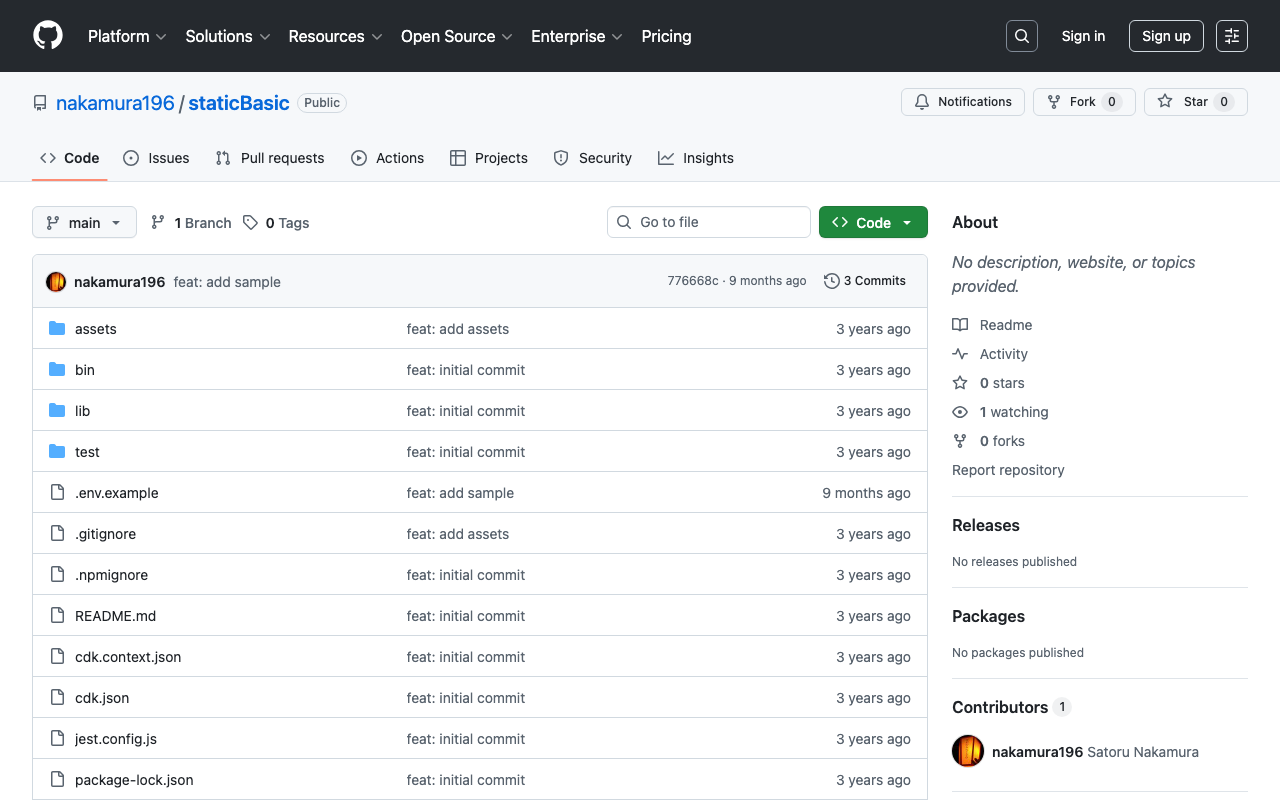
Overview I used AWS CDK to create a static site with CloudFront + S3. Additionally, I used CloudFront Functions to add Basic authentication and processing to append index.html to requests that do not include a filename or extension in the URL. I also added a custom domain, so this is a memo of the process. While somewhat incomplete, the source code is available in the following repository. https://github.com/nakamura196/staticBasic The intended use is to prepare an .env file like the following and run cdk deploy. ...

May 16, 2023 · Updated: May 16, 2023 · 3 min · Nakamura

Creating an Anonymous File Uploader Using Google Drive and Google Apps Script

Overview I had the opportunity to create an anonymous file uploader using Google Drive and Google Apps Script, so this is a memo of the process. I referenced the following article. https://qiita.com/v2okimochi/items/06ed1ce7c56a877a1e10 Creating the Web App First, access Apps Script from the following URL. https://script.google.com/ Click “New project.” The following screen will be displayed. Copy and paste the following code. For the second line, <Google Drive upload folder ID>, create an upload folder in Google Drive in advance and obtain its ID. ...

May 11, 2023 · Updated: May 11, 2023 · 3 min · Nakamura

Sending Google Spreadsheet Update Notifications to GitHub

Overview I investigated how to send notifications to GitHub when a Google Spreadsheet is updated using Google Apps Script. I also looked into how to send notifications from Strapi and Contentful to GitHub, so I am recording this as a reference. Google Apps Script By preparing a script like the following, I was able to send spreadsheet update notifications to GitHub. const token = "ghp_xxx" const owner = "yyy" const repo = "zzz" const event_type = "aaa" function postSheetChange() { const headers = { "Accept": "application/vnd.github+json", "Authorization": `Bearer ${token}`, "Content-Type": "application/json" } var payload = JSON.stringify({ event_type }); var requestOptions = { method: 'POST', headers, payload, }; UrlFetchApp.fetch(`https://api.github.com/repos/${owner}/${repo}/dispatches`, requestOptions) } The following article was helpful for setting up triggers. ...

April 27, 2023 · Updated: April 27, 2023 · 2 min · Nakamura

Drupal: An Example of Searching Nested Fields

Overview In the following article, I investigated how to search nested fields using Strapi. This time, I will investigate how to do the same thing with Drupal. For this investigation, Book and Author content has already been registered in the following article. The following article was helpful for filtering methods. https://www.drupal.org/docs/core-modules-and-themes/core-modules/jsonapi-module/filtering Search Examples The following searches are performed against: /jsonapi/node/book? Search for books containing an author with hobby=dance SHORT filter[field_authors.field_hobby]=dance ...

April 24, 2023 · Updated: April 24, 2023 · 2 min · Nakamura

Strapi: How to Filter Results by Deeply Nested Fields

Overview The following article introduces how to filter results by deeply nested fields. https://strapi.io/blog/deep-filtering-alpha-26 As described above, by preparing the content types and fields, I was able to obtain the intended results. Notes As mentioned in the comments of the above article, the text contains “" characters, but these appear to be unnecessary. Incorrect GET /api/books?filters\[authors\][hobby][$contains]=dance By using the query without “" as follows, the intended results were obtained. Correct GET /api/books?filters[authors][hobby][$contains]=dance Summary I hope this serves as a helpful reference. ...

April 22, 2023 · Updated: April 22, 2023 · 1 min · Nakamura

Drupal: Adding Content Types and Fields Using Custom Modules

Overview This is a memo on how to add content types and fields using Drupal custom modules. The following two articles were helpful. https://www.drupal.org/docs/drupal-apis/entity-api/creating-a-custom-content-type-in-drupal-8 https://www.digitalnadeem.com/drupal/how-to-create-content-type-fields-and-view-while-installing-custom-module-in-drupal-9-using-configuration-manager/ Car Brand Example Following the first article introduced above, I was able to add a content type “Car Brand” with a “body” field. Note that the above article skips the part about creating the custom module. First, create the following folder and file. name: foobar description: Sample module package: Custom type: module version: 1.0 core_version_requirement: ^8 || ^9 Adding Custom Fields Using the above as reference, I was able to add a content type, but to add custom fields, I needed to add both a Field and a Field storage. ...

April 21, 2023 · Updated: April 21, 2023 · 3 min · Nakamura

Drupal: Creating Custom REST Resources

Overview I created a custom REST resource by following the instructions below. https://www.drupal.org/docs/drupal-apis/restful-web-services-api/custom-rest-resources By following the above article, I was able to obtain a JSON result from the following URL. /demo_rest_api/demo_resource { "message": "Hello, this is a rest service" } REST UI Module The above article included the following note: If you are using the REST UI contrib module, you should now be able to see it in the list of available endpoints and you should be able to configure the GET method. ...

April 20, 2023 · Updated: April 20, 2023 · 2 min · Nakamura

Text Selection Using VueUse (Nuxt 3)

Overview This is a personal note on using VueUse for implementing text selection functionality with Nuxt 3 (Vue 3). https://vueuse.org/ Demo You can try it from the following page. https://nuxt3-demo-git-main-nakamura196.vercel.app/textSelection The source code is at the following URL. https://github.com/nakamura196/nuxt3-demo/blob/main/pages/textSelection.vue Installation Method The installation instructions are described on the following page. https://vueuse.org/guide/ The specific steps are as follows. npm i -D @vueuse/nuxt @vueuse/core // nuxt.config.ts export default defineNuxtConfig({ modules: [ '@vueuse/nuxt', ], }) Summary In addition to text selection, there seem to be many other useful features available, so I would like to continue trying them out. ...

April 19, 2023 · Updated: April 19, 2023 · 1 min · Nakamura

Search Using Drupal Search API in Next.js for Drupal (Faceted Search, etc.)

Overview I tried Next.js for Drupal. https://next-drupal.org/ By following the “Get Started” guide, I was able to integrate Next.js with Drupal. https://next-drupal.org/learn/quick-start Additionally, the following article introduces an implementation example for faceted search. https://next-drupal.org/guides/search-api This article is my notes specifically on implementing the latter, faceted search. Search API Create a Server and index as follows. The official site provides the following as a reference: https://www.drupal.org/docs/contributed-modules/search-api For a Japanese-language reference: https://www.acquia.com/jp/blog/introduction-to-search-api-1 ...

April 17, 2023 · Updated: April 17, 2023 · 2 min · Nakamura

Does Contentful Full-Text Search Require Search Terms of 2 or More Characters?

I am using Contentful, and it appears that search terms of 2 or more characters are required. A query will ignore search tokens with less than 2 characters. https://www.contentful.com/developers/docs/references/content-delivery-api/#/reference/search-parameters/full-text-search-on-a-field This point requires attention when dealing with data that includes Japanese and other languages. Addendum With microCMS, searching from 1 character was possible. https://microcms.io/

April 14, 2023 · Updated: April 14, 2023 · 1 min · Nakamura

How to Bulk Delete Content in Drupal

Overview I looked into how to bulk delete content in Drupal, so this is a memo. The following article was helpful. https://www.webwash.net/how-to-bulk-delete-content-in-drupal/ The following three methods were introduced. Using Drupal Core UI Using Drush Using Drupal Views Bulk Operations (VBO) Using Drupal Core UI The following is a translation of the original description. If you have a small Drupal site and fewer than about 300 nodes to delete, you should use this method. This is because the Drupal Core UI only allows deleting 50 nodes at a time by default. As the site grows larger, this becomes tedious. ...

April 14, 2023 · Updated: April 14, 2023 · 2 min · Nakamura

Connecting Drupal with Amazon OpenSearch Service

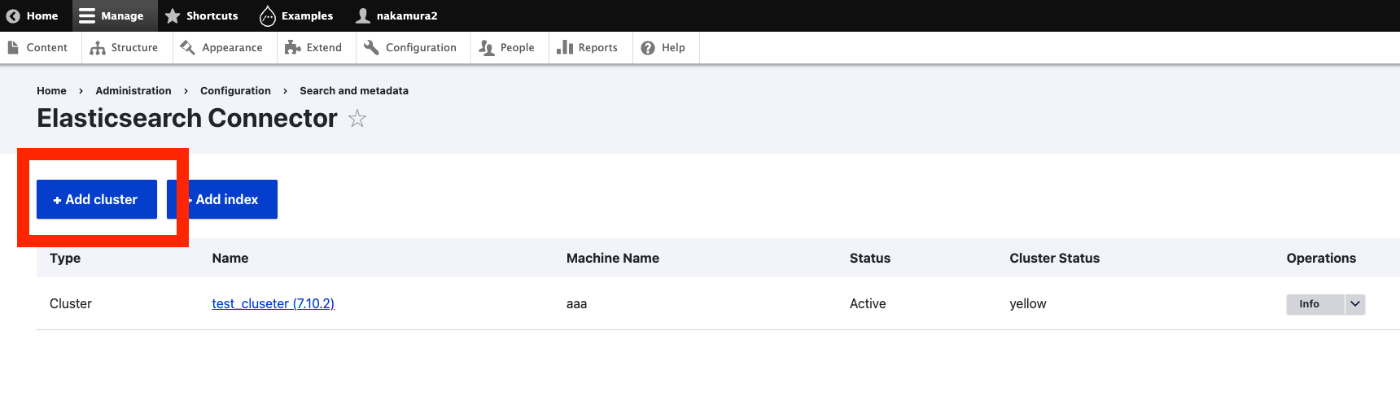
Overview I had the opportunity to connect Drupal with Amazon OpenSearch Service, so this is a personal note for future reference. The following article was helpful. https://www.acquia.com/jp/blog/intergration-with-drupal-and-elasticsearch Module Installation In addition to drupal/search_api and drupal/elasticsearch_connector, it was necessary to install nodespark/des-connector. (There may be room for improvement in how version specifications are handled.) composer require "nodespark/des-connector:^7.x-dev" composer require 'drupal/search_api:^1.29' composer require "drupal/elasticsearch_connector ^7.0@alpha" Then, enable them with the following. drush pm:enable search_api elasticsearch_connector Connecting Drupal to Elasticsearch Cluster Access the following. ...

April 13, 2023 · Updated: April 13, 2023 · 3 min · Nakamura

Trying GraphQL with Drupal

Overview I tried GraphQL with Drupal, so this is a personal note for future reference. The following document was helpful. https://drupal-graphql.gitbook.io/graphql/ This assumes Drupal installed on Amazon Lightsail. Module Installation Install the following module. https://www.drupal.org/project/graphql However, it was necessary to install the following module beforehand. https://www.drupal.org/project/typed_data As a result, the installation was completed with the following commands. cd /home/bitnami/stack/drupal composer require 'drupal/typed_data:^1.0@beta' composer require 'drupal/graphql:^4.4' Module Installation from GUI I checked all three related modules below and installed them. ...

April 12, 2023 · Updated: April 12, 2023 · 1 min · Nakamura

Adding GraphQL to Strapi

Overview In the following article, I launched Strapi on Amazon Lightsail. This time, I add GraphQL and try using it. Installing the GraphQL Plugin I ran the following. Please adjust paths like backend as needed. cd /opt/bitnami/apache2/htdocs/backend yarn add @strapi/plugin-graphql Then, start the application. yarn develop Accessing /graphql displays the following screen. I had already created a content type called services with a field called title. So by issuing the following query, I was able to retrieve the list and metadata. ...

April 12, 2023 · Updated: April 12, 2023 · 1 min · Nakamura

Registering Taxonomies and Adding Them to Content in Drupal Using Python

Overview This is a continuation of the following series. This time, we will register taxonomies and add them to content. Registering Taxonomies A taxonomy called ne_class was created in advance through the GUI. It can be listed at the following URL. /jsonapi/taxonomy_term/ne_class Below is the program for registering a new taxonomy. Please configure host, username, and password as appropriate. payload = { "data": { "type": "taxonomy_term--ne_class", "attributes": { "name": "干瀬", } } } _type = "ne_class" url = f"{host}/jsonapi/taxonomy_term/{_type}" r = requests.post(url, headers=headers, auth=(username, password), json=payload) r.json() The following result is obtained. ...

April 11, 2023 · Updated: April 11, 2023 · 2 min · Nakamura

Updating and Deleting Drupal Content Using Python

Overview In the following article, I described how to create new content. This time, I’ll try updating and deleting existing content. Filtering Items With the following program, you can retrieve registered content. This time, I retrieved content with the title “Pre-update title.” res["data"] is an array. username = "xxx" password = "xxx" host = "xxx" query = { "title": "更新前のタイトル" } item_type = "article" filters = [] for key, value in query.items(): filters.append(f'filter[{key}]={value}') filter_str = '&'.join(filters) endpoint = f'{host}/jsonapi/node/{item_type}?{filter_str}' r = requests.get(endpoint, headers=headers, auth=(username, password)) res = r.json() len(res['data']) Getting the ID of the Content to Update An ID like 730f844d-b476-4485-8957-c33fccb7f8ac is obtained. ...

April 11, 2023 · Updated: April 11, 2023 · 1 min · Nakamura

Adding Content to Drupal Using Python

Overview I had an opportunity to add content to Drupal using Python, so this is a memo of the process. I referenced the following article. https://weimingchenzero.medium.com/use-python-to-call-drupal-9-core-restful-api-to-create-new-content-9f3fa8628ab4 Preparing Drupal I set it up on Amazon Lightsail. The following article is a useful reference. https://annai.co.jp/article/use-aws-lightsail Modules Install the following modules. HTTP Basic Auth JSON:API RESTful Web Services Serialization Changing JSON:API Settings Access the following page to change the settings. </admin/config/services/jsonapi> Python Set {IP address or domain name} and {password} as appropriate. ...

April 11, 2023 · Updated: April 11, 2023 · 2 min · Nakamura

Running Strapi on Amazon Lightsail (SSL, Custom Domain)

Overview I had the opportunity to run Strapi on Amazon Lightsail, so here are my notes. I referenced the following article: https://zenn.dev/holykzm/articles/1e54cc25207657 Instance Select Node.js. Choose an instance with at least 1GB of memory. If you build on Lightsail, an out-of-memory error will occur with less. SSL and Custom Domain Please refer to the following: https://zenn.dev/nakamura196/articles/5772d6c918508a#独自ドメインの付与 Assign a Static IP, configure a custom domain in Route 53, and run the following: ...

April 11, 2023 · Updated: April 11, 2023 · 2 min · Nakamura