Creating an Inline Marker Tool with Editor.js

Overview These are notes on how to create an inline marker tool with Editor.js. References The following pages were helpful: https://editorjs.io/creating-an-inline-tool/ https://note.com/eveningmoon_lab/n/n638b9541c47c For writing in TypeScript, the following was helpful: https://github.com/codex-team/editor.js/issues/900 Implementation Implemented with Nuxt. Create the following marker.ts: import type { API } from "@editorjs/editorjs"; class MarkerTool { button: null | HTMLButtonElement; state: boolean; api: API; tag: string; class: string; // 静的メソッドで許可されるHTMLタグと属性を指定 static get sanitize() { return { mark: { class: "cdx-marker", }, }; } // インラインツールとしての振る舞いを定義 static get isInline() { return true; } constructor({ api }: { api: API }) { this.api = api; this.button = null; this.state = false; this.tag = "MARK"; this.class = "cdx-marker"; } // ボタン要素を作成し、SVGアイコンを設定 render() { this.button = document.createElement("button"); this.button.type = "button"; this.button.innerHTML = '<svg width="20" height="18"><path d="M10.458 12.04l2.919 1.686-.781 1.417-.984-.03-.974 1.687H8.674l1.49-2.583-.508-.775.802-1.401zm.546-.952l3.624-6.327a1.597 1.597 0 0 1 2.182-.59 1.632 1.632 0 0 1 .615 2.201l-3.519 6.391-2.902-1.675zm-7.73 3.467h3.465a1.123 1.123 0 1 1 0 2.247H3.273a1.123 1.123 0 1 1 0-2.247z"/></svg>'; this.button.classList.add(this.api.styles.inlineToolButton); return this.button; } // 選択されたテキストを <mark> タグで囲む surround(range: Range) { if (this.state) { this.unwrap(range); return; } this.wrap(range); } // テキストを <mark> タグでラップ wrap(range: Range) { const selectedText = range.extractContents(); const mark = document.createElement(this.tag); mark.className = this.class; // class 属性の追加 mark.appendChild(selectedText); range.insertNode(mark); this.api.selection.expandToTag(mark); } // <mark> タグを解除 unwrap(range: Range) { const mark = this.api.selection.findParentTag(this.tag); const text = range.extractContents(); mark?.remove(); range.insertNode(text); } // ツールの状態をチェック checkState() { const mark = this.api.selection.findParentTag(this.tag, this.class); this.state = !!mark; if (this.state) { this.button?.classList.add("cdx-marker--active"); } else { this.button?.classList.remove("cdx-marker--active"); } } } export default MarkerTool; Call it as follows: ...

April 19, 2024 · Updated: April 19, 2024 · 3 min · Nakamura

Changing the max-width of Editor.js

Overview When using Editor.js, large margins appear on the left and right sides by default. This article introduces how to solve this issue. Method The following was helpful. https://github.com/codex-team/editor.js/issues/1328 Specifically, add the following CSS. .ce-block__content, .ce-toolbar__content { max-width: calc(100% - 80px) !important; } .cdx-block { max-width: 100% !important; } The full source code is as follows. <script setup lang="ts"> import EditorJS from "@editorjs/editorjs"; import type { OutputData } from "@editorjs/editorjs"; const blocks = ref<OutputData>({ time: new Date().getTime(), blocks: [ { type: "paragraph", data: { text: "大明副使蒋 承奉すらく 、 欽差督察総制提督浙江等処軍務各衙門 、近年以来、日本各島小民、仮るに買売を以て名と為し 、 しばしば中国辺境を犯し、居民を刼掠するを因となし、旨を奉じて 、 浙江等処承宣布政使司 に議行し、本職に転行して 、 親しく貴国に詣り面議せしめん等の因あり。", }, }, ], }); const editor = () => { new EditorJS({ holder: "editorjs", data: blocks.value, onChange: async (api) => { blocks.value = await api.saver.save(); }, }); }; editor(); </script> <template> <div style="background-color: aliceblue"> <div id="editorjs"></div> <hljson :content="blocks" /> </div> </template> <style> .ce-block__content, .ce-toolbar__content { max-width: calc(100% - 80px) !important; } .cdx-block { max-width: 100% !important; } pre { background-color: #f4f4f4; border: 1px solid #ccc; padding: 10px; } </style> As a result, the left and right margins were reduced as shown below. ...

April 18, 2024 · Updated: April 18, 2024 · 1 min · Nakamura

Checking Which Users Belong to a Specific Group on a Linux System

Overview ! This is an answer from ChatGPT 4. There are several ways to check which users belong to a specific group on a Linux system. Here, we explain how to list users belonging to specific groups (in this case, “group1” and “group2”) using the command line. Method 1: Check the /etc/group File On Linux, the /etc/group file stores information about all groups on the system and the users belonging to them. By checking this file, you can identify users in a specific group. ...

April 18, 2024 · Updated: April 18, 2024 · 2 min · Nakamura

Partial Match Search with the Advanced Search Module in Omeka S

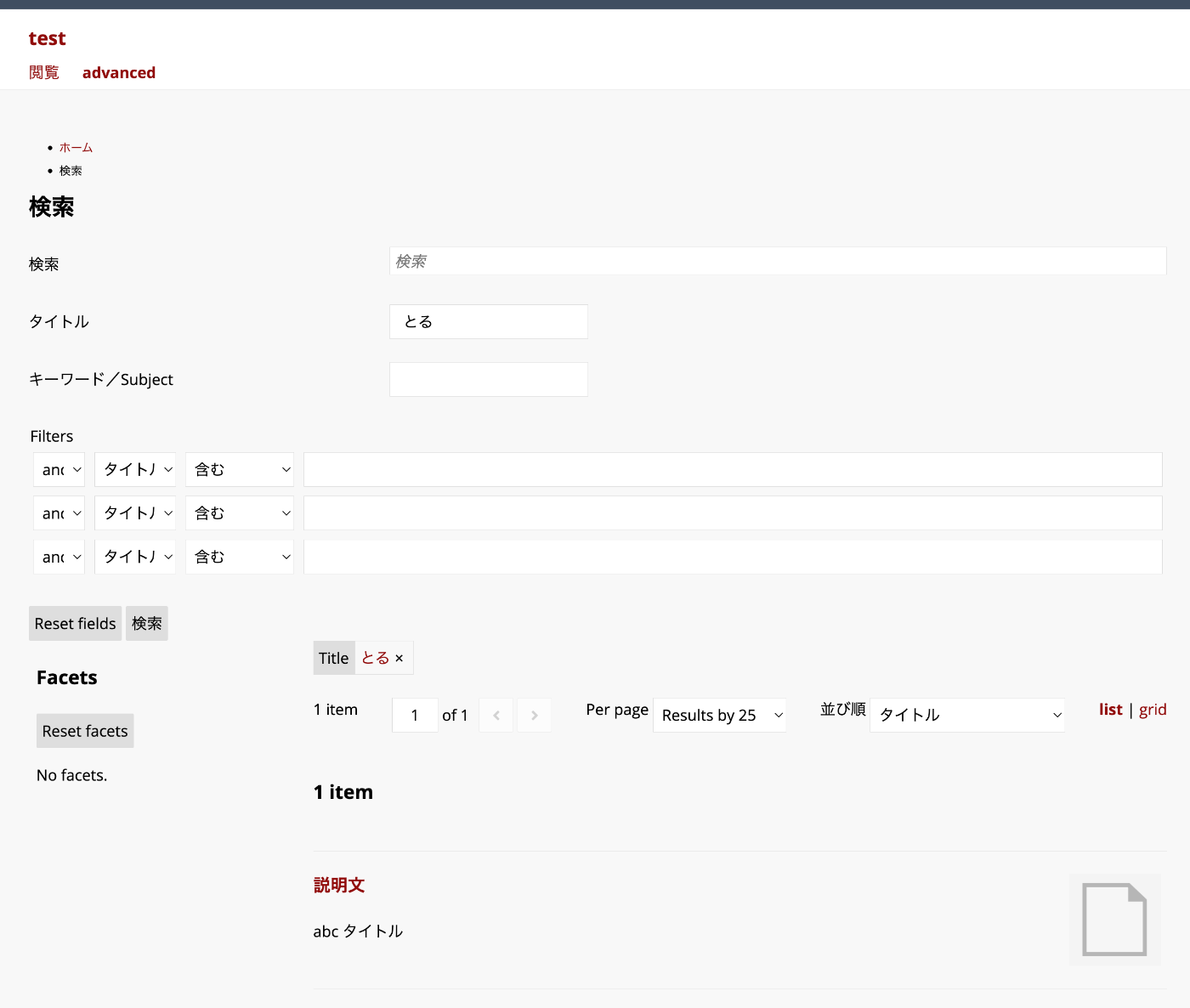
Overview This article explains how to perform partial match searches using filters added through the Advanced Search module. In the example above, the query string “toru” matches items with the title “abc title”. Background The Advanced Search module allows you to flexibly configure search conditions and facets. https://omeka.org/s/modules/AdvancedSearch/ In particular, when combined with the “Reference” module, faceted search like the following can be achieved. You can also add filters. However, when performing partial match searches with filters, additional configuration is required. ...

April 17, 2024 · Updated: April 17, 2024 · 1 min · Nakamura

Creating a Custom Search Page in Omeka S

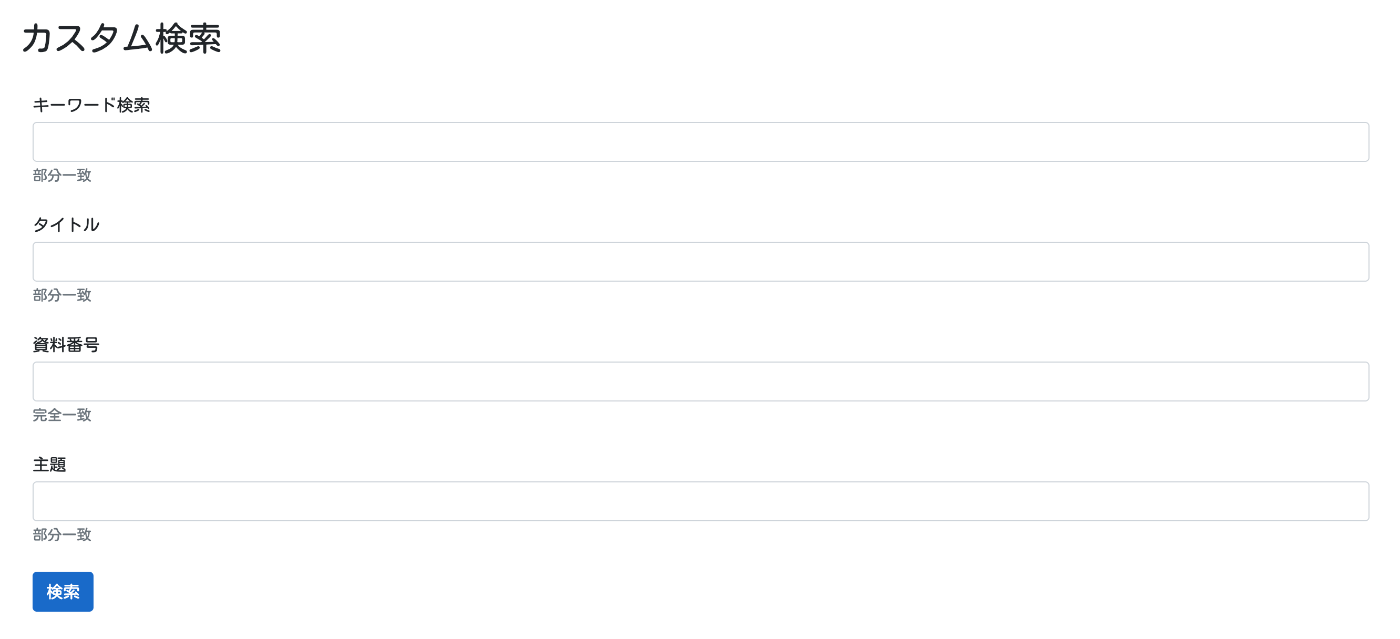
Overview This article introduces how to create a custom search page like the following in Omeka S. Background For creating search pages in Omeka S, I previously introduced a method to limit filter items on the advanced search screen. However, as shown in the overview, there are cases where you want to create a search screen that lists only specific items. For creating such a search page, you can use the “Advanced Search” module. ...

April 17, 2024 · Updated: April 17, 2024 · 4 min · Nakamura

Using the API of the Curriculum Guidelines Code Recommendation App

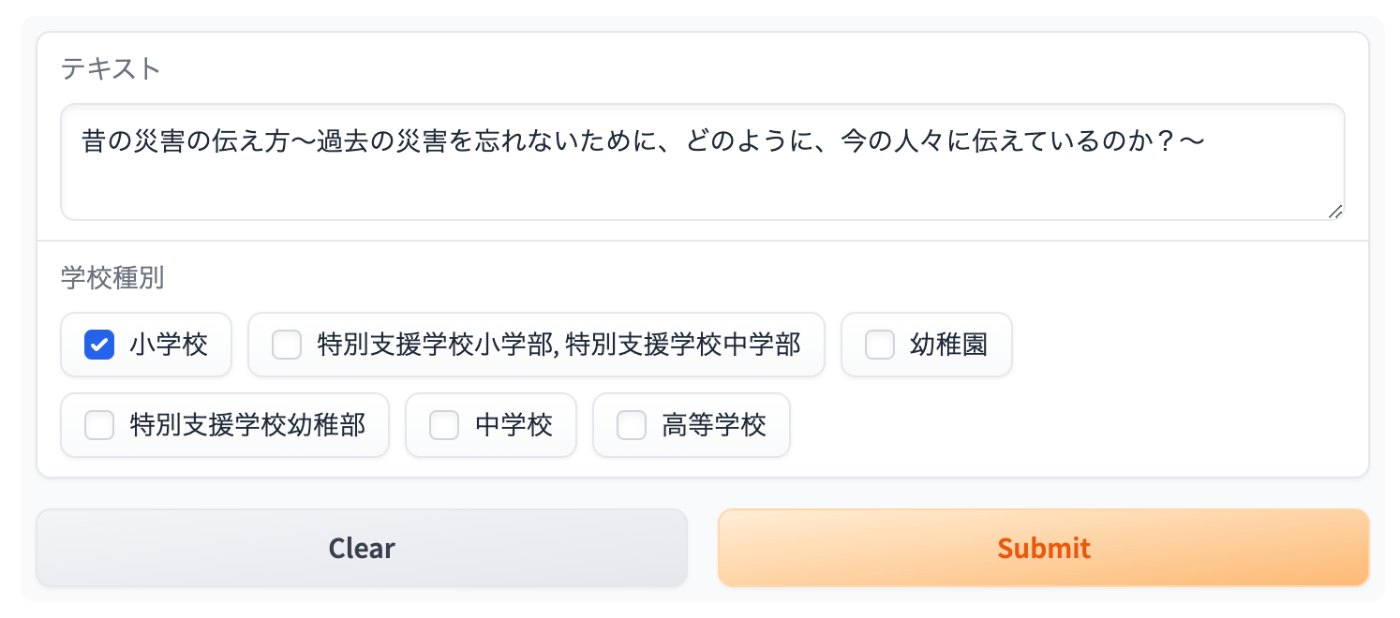
Overview In the following article, I introduced a recommendation app for Japan’s Curriculum Guidelines (Gakushu Shido Yoryo) codes. This time, I introduce how to use the above recommendation app via Gradio’s API. Usage Install the library. pip install gradio_client For example, let’s use the following data. Text School Type Investigate the mechanisms of air guns, water guns, bottle rockets, etc., and notice that as air is compressed and its volume decreases, the repulsive force increases, but water cannot be compressed. Elementary School Since the JSON data is stored in the second element of the result array, it is retrieved with result[1]. ...

April 16, 2024 · Updated: April 16, 2024 · 1 min · Nakamura

Prototype of a Course of Study Code Recommendation App

Overview I created a Course of Study code recommendation app, and this is an introduction to it. You can try it on the following Hugging Face Space. It utilizes the Course of Study LOD. https://huggingface.co/spaces/nakamura196/jp-cos Usage Enter any text in the text form. “School Type” is an optional field. Results are displayed on the right side of the screen. Sample inputs are also provided, so please try them out. Information from NHK for School is used. ...

April 16, 2024 · Updated: April 16, 2024 · 2 min · Nakamura

Using the researchmap API

Overview I had the opportunity to create a publication list using the researchmap API, so here are my notes. Query Examples for the researchmap API Here are some query examples for the researchmap API. Retrieve a list of papers https://api.researchmap.jp/nakamura.satoru/published_papers Specify a limit (limit usage) https://api.researchmap.jp/nakamura.satoru/published_papers?limit=5 Retrieve results from a specific offset (start usage) https://api.researchmap.jp/nakamura.satoru/published_papers?limit=5&start=6 Specify publication dates (from_date and to_date) https://api.researchmap.jp/nakamura.satoru/published_papers?from_date=2023-04-01&to_date=2024-03-31 Python Usage Example Based on the specified user and publication dates, export published_papers and presentations to Excel. ...

April 15, 2024 · Updated: April 15, 2024 · 2 min · Nakamura

TEI/XML Visualization Example: Map Display Using Leaflet

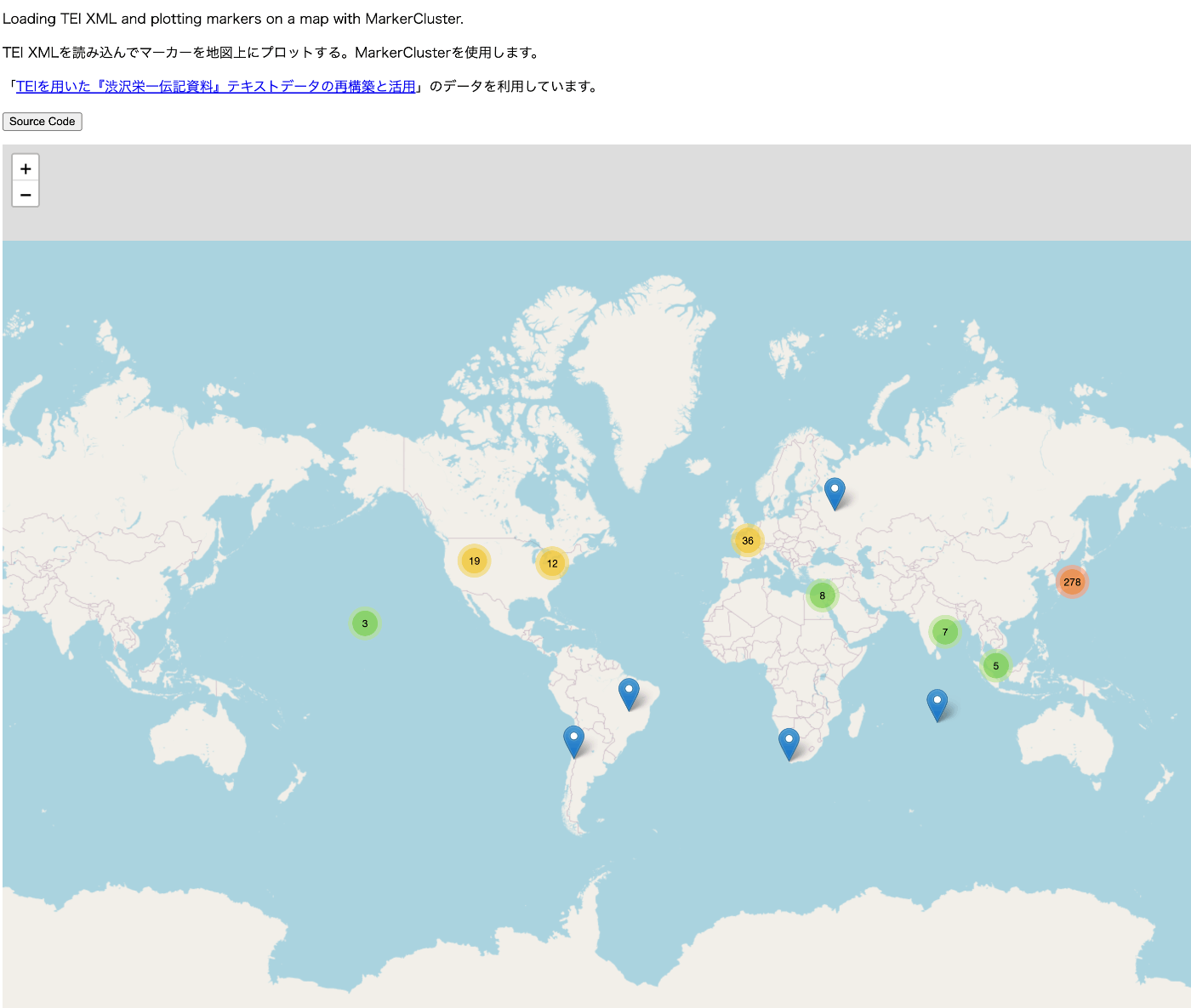
Overview For visualizing TEI/XML files, I created a repository that publishes visualization examples and source code. https://github.com/nakamura196/tei_visualize_demo You can see the visualization examples on the following page. https://nakamura196.github.io/tei_visualize_demo/ This time, I added an example of marker display using MarkerCluster, which I’ll introduce here. Prerequisites This assumes that you can already display markers using Leaflet (without using MarkerCluster). If you haven’t done so yet, please refer to the following visualization example and source code. ...

April 12, 2024 · Updated: April 12, 2024 · 2 min · Nakamura

Creating a Sitemap in Nuxt 3

Overview There are several ways to create a sitemap in Nuxt 3, so here are my notes. [1] @nuxtjs/sitemap Documentation https://sitemap.nuxtjs.org/ Reference Article https://zenn.dev/kumao/articles/3fe10078a7e9d2 Installation npm install -D @nuxtjs/sitemap Repository https://github.com/nuxt-community/sitemap-module [2] sitemap Reference Article https://zenn.dev/kakkokari_gtyih/articles/db1aed4fed6054 Installation npm install -D sitemap Repository https://github.com/ekalinin/sitemap.js [3] nuxt-simple-sitemap This package has the following note, so using @nuxtjs/sitemap from [1] seems to be the better choice: Package has been migrated to @nuxtjs/sitemap. https://www.npmjs.com/package/nuxt-simple-sitemap ...

March 8, 2024 · Updated: March 8, 2024 · 1 min · Nakamura

Verifying OAuth Authentication Using Drupal's Simple OAuth and Postman

Overview This article verifies OAuth authentication using Drupal’s Simple OAuth and Postman. I previously wrote the following article, but this time I will go into more detail. Setting Up Simple OAuth in Drupal Please refer to the following: https://nakamura196.pages.dev/en/posts/e4ce978db12227/#Creating an OAuth Client Postman When the grant type is password Send a POST request to /oauth/token with the following specified in Body > x-www-form-urlencoded: Key Value grant_type password client_id {your CLIENT_ID, e.g.: gt8UKlKltI4qs1XP5KLucIXiYw9ulGb0xS4RyO437dc} client_secret {your CLIENT_SECRET, e.g.: test} username {username, e.g.: yamato} password {password, e.g.: yamato} The following JSON was returned: ...

March 2, 2024 · Updated: March 2, 2024 · 5 min · Nakamura

Trying Out METSFlask

Overview I will try out the following METSFlask. https://github.com/tw4l/METSFlask It is described as follows: A web application for human-friendly exploration of Archivematica METS files Usage You can try it on the following site. http://bitarchivist.pythonanywhere.com/ Here is the result of uploading a METS file. In this case, since only one Word file was stored, information about one original file is displayed. Clicking the View button navigates to the detail screen. ...

February 27, 2024 · Updated: February 27, 2024 · 4 min · Nakamura

Trying the Access to Memory RESTful API

Overview Let’s try some examples of the Access to Memory RESTful API. The official documentation is available here: https://www.accesstomemory.org/en/docs/2.8/dev-manual/api/api-intro/ Browse taxonomy terms https://demo.accesstomemory.org/api/taxonomies/34 [ { "name": "Collection" }, { "name": "File" }, { "name": "Fonds" }, { "name": "Item" }, { "name": "Part" }, { "name": "Record group" }, { "name": "Series" }, { "name": "Sous-fonds" }, { "name": "Subseries" } ] Browse information objects endpoint https://demo.accesstomemory.org/api/informationobjects { "total": 460, "results": [ { "reference_code": "CA ON00012 SC105", "slug": "kathleen-munn-fonds", "title": "Kathleen Munn fonds", "repository": "Art Gallery of Ontario", "level_of_description": "Fonds", "creators": [ "Munn, Kathleen Jean, 1887-1974" ], "creation_dates": [ "1912-[193-]" ] }, { "reference_code": "CA ON00012 SC069", "slug": "gallery-44-centre-for-contemporary-photography-fonds", "title": "Gallery 44 Centre for Contemporary Photography fonds", "repository": "Art Gallery of Ontario", "level_of_description": "Fonds", "creators": [ "Gallery 44 Centre for Contemporary Photography" ], "creation_dates": [ "[ca. 1979] - 2000" ], "place_access_points": [ "Toronto", "York, Regional Municipality of", "Ontario", "Canada" ] }, { "slug": "bitter-paradise-sell-out-of-east-timor-fonds", "title": "*Bitter Paradise: The Sell-Out of East Timor* fonds", "repository": "University of British Columbia Archives", "level_of_description": "Fonds", "creators": [ "Briere, Elaine" ], "creation_dates": [ "1985 - 1997" ] }, ... Read information object endpoint Let’s retrieve the record that was obtained via OAI in the following article through the API. ...

February 26, 2024 · Updated: February 26, 2024 · 2 min · Nakamura

Trying the ArchivesSpace RESTful API

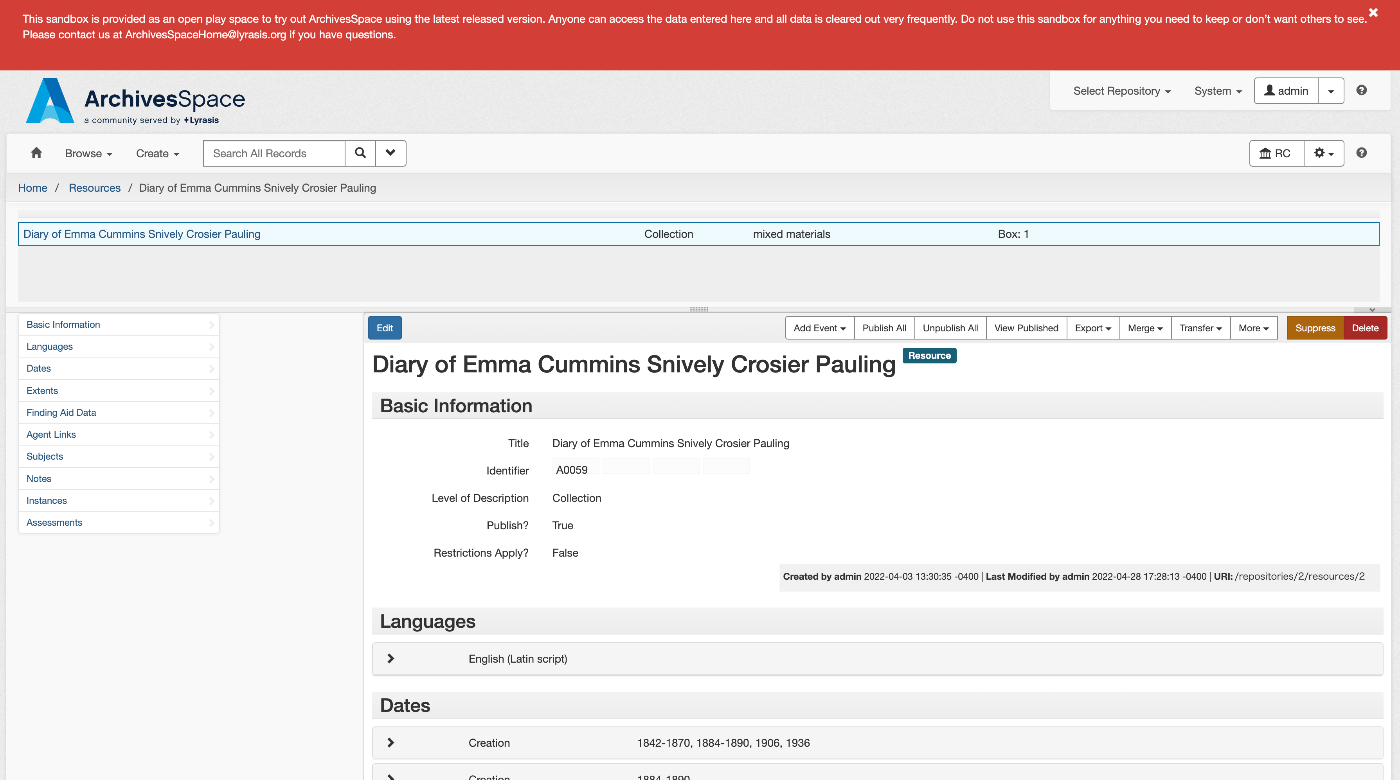
Overview Let’s try an example of the ArchivesSpace RESTful API. The official documentation is available here: https://archivesspace.github.io/archivesspace/api/#introduction List all corporate entity agents Documentation is available here: https://archivesspace.github.io/archivesspace/api/#list-all-corporate-entity-agents When using the demo site, you can access it at the following URL: https://sandbox.archivesspace.org/staff/api/agents/corporate_entities?page=1 The result is as follows: { "first_page": 1, "last_page": 3, "this_page": 1, "total": 27, "results": [ { "lock_version": 5, "publish": false, "created_by": "admin", "last_modified_by": "admin", "create_time": "2022-03-23T13:44:30Z", "system_mtime": "2024-02-25T06:02:12Z", "user_mtime": "2022-05-17T20:46:06Z", "is_slug_auto": false, "jsonmodel_type": "agent_corporate_entity", "agent_contacts": [ { "lock_version": 0, "name": "Manuscripts Repository", "created_by": "admin", "last_modified_by": "admin", "create_time": "2022-05-17T20:46:06Z", "system_mtime": "2022-05-17T20:46:06Z", "user_mtime": "2022-05-17T20:46:06Z", "is_representative": true, "jsonmodel_type": "agent_contact", "telephones": [ ], "notes": [ ] } ], "agent_record_controls": [ ], "agent_alternate_sets": [ ], "agent_conventions_declarations": [ ], "agent_other_agency_codes": [ ], "agent_maintenance_histories": [ ], "agent_record_identifiers": [ ], "agent_identifiers": [ ], "agent_sources": [ ], "agent_places": [ ], "agent_occupations": [ ], "agent_functions": [ ], "agent_topics": [ ], "agent_resources": [ ], "linked_agent_roles": [ ], "external_documents": [ ], "notes": [ ], "used_within_repositories": [ ], "used_within_published_repositories": [ ], "dates_of_existence": [ ], "used_languages": [ ], "metadata_rights_declarations": [ ], "names": [ { "lock_version": 0, "primary_name": "Allen Doe Research Center", "sort_name": "Allen Doe Research Center", "sort_name_auto_generate": true, "created_by": "admin", "last_modified_by": "admin", "create_time": "2022-05-17T20:46:06Z", "system_mtime": "2022-05-17T20:46:06Z", "user_mtime": "2022-05-17T20:46:06Z", "authorized": true, "is_display_name": true, "jurisdiction": false, "conference_meeting": false, "source": "local", "jsonmodel_type": "name_corporate_entity", "use_dates": [ ], "parallel_names": [ ] } ], "related_agents": [ ], "uri": "/agents/corporate_entities/1", "agent_type": "agent_corporate_entity", "is_linked_to_published_record": false, "display_name": { "lock_version": 0, "primary_name": "Allen Doe Research Center", "sort_name": "Allen Doe Research Center", "sort_name_auto_generate": true, "created_by": "admin", "last_modified_by": "admin", "create_time": "2022-05-17T20:46:06Z", "system_mtime": "2022-05-17T20:46:06Z", "user_mtime": "2022-05-17T20:46:06Z", "authorized": true, "is_display_name": true, "jurisdiction": false, "conference_meeting": false, "source": "local", "jsonmodel_type": "name_corporate_entity", "use_dates": [ ], "parallel_names": [ ] }, "title": "Allen Doe Research Center", "is_repo_agent": "Allen Doe Research Center" }, { ... In the GUI, the corresponding page is: ...

February 26, 2024 · Updated: February 26, 2024 · 3 min · Nakamura

Trying ArchivesSpace's OAI Repository

Overview ArchivesSpace is described as follows. https://github.com/archivesspace/archivesspace Built for archives by archivists, ArchivesSpace is the open source archives information management application for managing and providing web access to archives, manuscripts and digital objects. This article tries out the OAI Repository feature provided by ArchivesSpace. https://archivesspace.github.io/tech-docs/architecture/oai-pmh/ Configuration This time, we use the ArchivesSpace demo site. Access the following page and configure the necessary settings. https://sandbox.archivesspace.org/staff/oai_config/edit Retrieving the List of Metadata Formats The list of metadata formats was retrieved using the following. ...

February 26, 2024 · Updated: February 26, 2024 · 2 min · Nakamura

Trying Access to Memory's OAI Repository

Overview Access to Memory is described as follows. https://github.com/artefactual/atom AtoM (short for Access to Memory) is a web-based, open source application for standards-based archival description and access. The application is multilingual and multi-repository. First commissioned by the International Council on Archives (ICA) to make it easier for archival institutions worldwide to put their holdings online using the ICA’s descriptive standards, the project has since grown into an internationally used community-driven project. ...

February 26, 2024 · Updated: February 26, 2024 · 3 min · Nakamura

Tips for Using sidebase/nuxt-auth in a Production Environment

Overview This is a memo about important considerations when using sidebase/nuxt-auth in a production environment. sidebase/nuxt-auth is an authentication module for Nuxt 3 applications. https://github.com/sidebase/nuxt-auth Problem When deploying to Vercel or AWS Amplify, a server error occurred with the following message. AUTH_NO_ORIGIN: No `origin` - this is an error in production, see https://sidebase.io/nuxt-auth/resources/errors. You can ignore this during development Solution The following was helpful. https://github.com/sidebase/nuxt-auth/issues/613 By providing baseURL as shown below, the above error was resolved. ...

February 12, 2024 · Updated: February 12, 2024 · 1 min · Nakamura

Adding Japanese Translation to a Documentation Site Built with Sphinx

Overview I had the opportunity to add Japanese translation to a documentation site built with sphinx, so this is a note for reference. The target is the following. https://github.com/artefactual/archivematica-storage-service-docs Method First, fork the target repository. Next, clone it. git clone https://github.com/nakamura196/archivematica-storage-service-docs cd atom-docs Here, we create a Python virtual environment. python -m venv .venv source .venv/bin/activate pip install --upgrade pip pip install -r requirements.txt Adding Libraries Add sphinx-intl to requirements.txt and install it. ...

February 12, 2024 · Updated: February 12, 2024 · 2 min · Nakamura

Copying Build Results to Sakura Rental Server Using GitHub Actions and SCP

Overview I had an opportunity to copy build results to a Sakura rental server using GitHub Actions and SCP, so this is a memorandum of the process. I used the following GitHub Action. https://github.com/appleboy/scp-action Issue Encountered When I tried using the following notation, it worked fine when using act in the local environment, but it did not work when running on GitHub Actions. name: scp files on: [push] jobs: build: name: Build runs-on: ubuntu-latest steps: - uses: actions/checkout@v4 - name: copy file via ssh password uses: appleboy/scp-action@master with: host: ${{ secrets.HOST }} username: ${{ secrets.USERNAME }} password: ${{ secrets.PASSWORD }} port: ${{ secrets.PORT }} source: "tests/a.txt,tests/b.txt" target: your_server_target_folder_path Specifically, the following error occurred: ...

February 8, 2024 · Updated: February 8, 2024 · 2 min · Nakamura

Resolving mysqldump: not found in MariaDB

When using MariaDB, I tried to create a backup with the following command and encountered the error mysqldump: not found: mysqldump -uomeka -pomeka omeka > test.sql As a workaround, I referenced the following article and found that using mariadb-dump resolved the issue: https://mariadb.com/kb/en/mysqldump/ Specifically, the backup was successfully created using the following command: mariadb-dump -uomeka -pomeka omeka > test.sql I hope this serves as a useful reference for anyone experiencing the same issue. ...

February 7, 2024 · Updated: February 7, 2024 · 1 min · Nakamura